

SAP Journal Entry Compliance: SOX, Audit Trails, and Segregation of Duties

SAP journal entry compliance is the set of controls that ensures every manual general ledger entry in SAP is properly authorised, separated by duty, fully recorded, and provable to an external auditor. It is not a single requirement it is three interlocking controls: SOX Section 404 evidence, a continuous audit trail, and segregation of duties, all operating on the complete journal population

Key Takeaways

Three controls decide whether a manual journal survives an audit. Here is what each one asks of a journal entry, where they usually break, and what keeps them intact.

Every other transaction in the ledger has a document behind it. A payment has an invoice. A goods receipt has a purchase order. The manual journal entry has none of that. Someone decides the amount, the accounts, and the period, then posts it.

That is exactly why auditors treat manual journals as the highest-risk population in the general ledger, and why SAP journal entry compliance depends on three separate controls functioning together: SOX evidence, an unbroken audit trail, and segregation of duties.

This article covers what each control demands of a manual journal, where each typically fails, and what holds all three intact.

Why Manual Journal Entries Carry the Highest Compliance Risk in SAP

The manual journal is the one accounting entry created by human judgment rather than a source document. This absence of an originating transaction is what makes manual journal entry risk so difficult to detect and why it consistently sits at the top of every auditor’s testing list.

Auditing standards recognise that financial statements misstated due to fraud are often manipulated through inappropriate or unauthorised journal entries recorded during the year or at period end.1 That is why fraud-related audit procedures single the journal out.

A cost booked to the wrong period, an accrual reversed early, a reclassification with no support: each is a valid journal on its face, and only visible as a problem when someone can see who raised it, who approved it, and why.

Manual journals are also where management override tends to surface, because the people with authority to post are often the same people a control is meant to check. They cluster at period end too, when top-side adjustments and consolidation entries are made under time pressure, which is precisely when a weak control is most likely to be tested and most likely to give way.

SAP ECC mainstream support ends 2027. See how Promenta keeps journal control inside SAP through the transition.

What SOX Section 404 Requires for SAP Journal Entry Compliance

SOX Section 404 requires management to demonstrate that internal controls over financial reporting, including journal entry controls, operated effectively across the entire reporting period, not just at a point in time. Section 404 requires management to show those controls operated effectively across the whole reporting period.

In practice, SAP journal entry SOX testing means an auditor checks for evidence that controls worked across every manual journal in the period and a recurring finding is that organisations cannot demonstrate the control covered the complete population rather than a subset. A control that runs on half the journals is not one an auditor can rely on.

This is where SOX turns into a data problem: the evidence has to be complete, attributable to named people, and available for every manual entry in the period, not reconstructed after the close. A journal entry workflow solution earns its place when it produces that evidence as a by-product of the process, not as a separate reporting exercise assembled after the close.

That evidence also has to survive scrutiny months later, when an auditor selects a single journal from the period and asks the team to reproduce exactly what happened. If the reconstruction depends on someone’s memory or an archived mailbox, it is weaker than the control it is meant to support.

How Journal Entry Segregation of Duties Fails in SAP and How to Fix It

Journal entry segregation of duties keeps the person who prepares a manual entry separate from the person who approves it and, where possible, from the person who posts it. The control fails when standing SAP access allows one person to perform all three steps.

In SAP, the real exposure is standing access. If a user holds the finance posting transaction codes such as FB01, FB50, or FBS1, they can post a journal directly, whatever the approval process on paper says.

Access and segregation-of-duties weaknesses are not a fringe concern: analysis of adverse internal-control opinions found IT and access controls, including insufficient segregation of duties and excessive user privileges, rising to the top category of issues auditors cite.

It aligns with the ACFE’s 2024 study, which found a lack of internal controls was the most common weakness behind occupational fraud, and management override of existing controls the second.4 SoD only holds when the ability to post is removed from everyday users and granted through a controlled, approved path.

What a Complete SAP Journal Entry Audit Trail Must Cover

An SAP journal entry audit trail records who changed what, and when capturing the original request, every approval, the posting date and user, and any subsequent reversal, all within the same reportable system. For journal entries, that means the request, every approval, the posting, and any later reversal, all captured and reportable.

SAP records document-level detail natively, and a reversal creates its own linked entry rather than deleting the original, so the history stays intact. What auditors want on top of that is continuity: a single trail that runs from the moment a journal is proposed to the moment it is posted, with no stretch of the journey happening somewhere the trail cannot see.

A spreadsheet emailed for sign-off or an approval given in a separate tool is a gap. The posting may be recorded in SAP, but the decision behind it is not, and the trail can no longer answer the auditor’s question of who approved this and on what basis.

Auditors increasingly expect the trail to carry the supporting evidence as well: the attachment, the justification, and the calculation behind an accrual, held against the same document rather than in a folder someone has to go and find.

See Promenta's SAP Journal Workflow in Action

Built natively on SAP. No external servers, no duplicate financial data.

Where SAP Journal Entry Compliance Breaks Down and Why

All three controls break at the same point: the handoff, when a journal is prepared or approved outside SAP and then written back in.

The moment part of a journal’s life happens outside the system, the population splits. Some journals carry full SAP evidence; others carry evidence held in an external tool or a mailbox. SoD may be enforced in one place and bypassed in the other. The audit trail has a section it cannot explain. SOX testing then has to reconcile two systems to prove one control, which is slower and weaker than proving it once.

This is why the choice of journal entry compliance software matters. The most effective solutions never let a manual journal leave the system of record so there is only ever one population to test and one audit trail to produce. The alternative, stitching evidence together across an external platform and the ledger at audit time, is work most finance teams quietly absorb every close, and it is the source of most of the exceptions they end up explaining.

How to Maintain SAP Journal Entry Compliance Across SOX, Segregation of Duties, and Audit Trails

Promenta keeps the entire manual journal process inside SAP, so SOX evidence, segregation of duties, and the audit trail all operate on a single, complete population.

Preparation, validation, approval, and posting run inside SAP ECC or S/4HANA, with no external server in the path. A requester cannot approve their own journal, so SoD is enforced by the workflow rather than trusted to individuals.

Because journals are submitted through a controlled process, organisations can remove the powerful finance posting transaction codes from end users entirely, closing the standing-access gap that most SoD findings turn on. Every request, approval, and posting is captured in SAP and reportable there, so the audit trail is continuous by design, and a full simulated posting runs before a journal is submitted, so errors surface before they reach the ledger.

This is what makes SAP journal entry compliance a built-in property of how the work runs, not a report assembled after the close. For teams evaluating journal entry compliance software, the deciding question is not which product has the longest feature list, but whether SAP journal entry compliance evidence ever leaves the system of record.

For teams evaluating journal entry compliance and review tools, the deciding question is not which product has the longest feature list, but whether the control evidence ever leaves SAP. When it does not, compliance stops being a reconciliation exercise between systems.

SAP journal entry compliance is only as strong as its weakest handoff. SOX asks for complete evidence, segregation of duties asks that no one person controls a journal alone, and the audit trail asks for an unbroken record. 

Each of those holds when the journal never leaves SAP, and each develops a gap the moment it does. Treating journal entry compliance software as an architecture decision, rather than a reporting layer added after the fact, is what keeps all three intact at once.

Frequently Asked Questions

SAP journal entry compliance is the set of controls that make sure every manual journal posted to the SAP general ledger is properly authorised, separated by duty, recorded in full, and provable to an auditor.

It brings together three requirements: SOX evidence that controls operated across the period, segregation of duties between the person who prepares a journal and the person who approves it, and a complete audit trail of the request, approvals, posting, and any reversal. Compliance holds when all three apply to the whole population of journals, not a sample.

SAP can route a manual journal to designated approvers based on fields in the request such as company code, journal value, or G/L account, and record each approval before the journal is posted.

With a workflow layer like Promenta running inside SAP, approvals happen against a fully validated virtual journal, approvers are notified and can act from an inbox or from Excel, and no journal is created in the ledger until the required approvals are in place. Because the routing and the approvals are captured in SAP, the approval step is auditable rather than informal.

Journal entry compliance controls support an audit by producing the evidence auditors are required to examine journal entries for evidence of possible material misstatement due to fraud, and to consider the completeness of the population they test.

Controls support that work by producing the evidence the auditor needs: a record of who raised each journal, who approved it, whether the preparer and approver were different people, and what supporting documents were attached.

When those controls run inside the system of record, the auditor can test the full set of journals from one place instead of reconciling several sources. That reduces both audit effort and the risk of an undetected exception.

Yes. SAP records changes at the document level and handles a reversal by creating a linked reversing entry rather than deleting the original, so the history of a journal stays intact.

A workflow solution adds the front half of that history, the request and the approvals that preceded the posting, so the record runs continuously from proposal to posting to any later reversal.

The value for compliance is continuity: the trail can answer who did what and when across the journal’s whole life, with no stretch of it happening outside the system.

During the close, controllers need to know which manual journals are approved, posted, and complete, and which are still pending, before the books can be closed. Running the journal process inside SAP gives real-time visibility of that status and keeps segregation of duties, approvals, and the audit trail attached to every entry as it moves.

Instead of assembling compliance evidence after the close, the team finishes the close with the evidence already in place, which shortens the period and lowers the risk of a control gap being found later.

The three controls that make up SAP journal entry compliance are: (a) SOX Section 404 evidence demonstrating that journal entry controls operated across the complete reporting period; (b) segregation of duties ensuring no single user can prepare, approve, and post a journal without separate authorisation; and (c) an unbroken audit trail running from the initial request through every approval to the final posting and any reversal.

SAP Journal Entry Workflow: Steps, Roles, and Approval Explained

A well-controlled journal entry approval process is essential to effective financial management. Journal entries can affect general ledger balances, financial statements, management reporting, regulatory reporting, and the wider financial close process. Ensuring that each entry is properly prepared, reviewed, approved, documented, and posted is therefore an important part of maintaining financial control.

The complexity of this process increases as organisations grow. Larger businesses may manage journals across multiple entities, subsidiaries, departments, regions, and regulatory environments. Complex approval hierarchies, segregation-of-duties requirements, distributed finance teams, and audit obligations can all make journal entry management more difficult to coordinate.

As a result, organisations are increasingly looking at ways to automate and strengthen financial close journal approval processes. 42% of companies plan to automate their financial close processes. This reflects a broader shift towards structured, technology-enabled approaches to financial control.

A structured SAP journal entry approval workflow can help manage the journey from journal preparation to final posting, creating a consistent process for submission, validation, approval, documentation, and auditability.

What Is an SAP Journal Entry Approval Workflow?

An SAP journal entry approval workflow is a structured process that controls how a journal moves from preparation through to review, approval, and posting.

A workflow can manage:

The purpose of a workflow is not simply to move a journal from one person to another. It acts as an internal control mechanism, creating a consistent and traceable process for managing journal entries.

Without a structured workflow, approvals may rely on emails, manual follow-up, or individually maintained records. This can make it more difficult to ensure that the correct people have approved the journal, that supporting documentation is available, and that the full history of the transaction can be demonstrated.

An automated SAP journal entry workflow brings these activities together into a defined process and is critical in supporting SAP finance teams in eliminating SAP journal risk and passing SAP financial audits.

How the SAP Journal Entry Approval Workflow Works: Step by Step

The exact process will vary between organisations, but a typical SAP journal entry approval workflow may include the following stages.

Step 1: Journal Preparation

The process begins with a finance user, or journal preparer, creating the journal entry.

The preparer may provide:

For many finance teams, this preparation may take place in Excel or another familiar tool.

Products which bring SAP integrated functionality and processing into the Excel environment that finance users are familiar with, is a big value add. The next consideration is what happens to the journal afterwards: how it is controlled, reviewed, approved, documented, and transferred into SAP.

A familiar preparation environment can remain a valuable starting point, while automation provides the structure around the wider journal lifecycle.

Step 2: Journal Submission

Once the journal has been prepared, it is submitted into the workflow.

At this stage, the process can check whether:

This creates a formal starting point for the journal approval process.

Rather than relying on an email being sent to the right person or a finance user manually tracking the next step, the journal enters a defined workflow and automatically reaches the right approvers, with a clear status and process history.

This level of automation and control prevents SAP journal audit findings and ensures that the planned rule-based approval process sis followed.

Step 3: Automated Validation and Controls

Before the journal progresses through approval, automated validation and control checks can be applied.

These may include:

A key consideration is when validation takes place.

In a robust SAP journal entry workflow, such as Promenta, a full posting simulation is run at the request stage of the process. This is the optimum approach through a fully validated virtual journal which has passed a simulated posting before the entry moves forward.

This means that if the journal fails a relevant validation check, the requester can see the issue immediately rather than waiting until after a multi-stage approval process has been completed.

Early validation can help reduce rework and prevent an invalid journal from progressing through the workflow only to fail at a later stage.

This design supports a compliant but faster SAP period close.

See Promenta's SAP Journal Workflow in Action

Built natively on SAP. No external servers, no duplicate financial data.

Step 4: Approval Routing

Once the journal has passed the required checks, it is routed to the appropriate reviewer or approver.

Approval routing can be based on factors such as:

Not every journal necessarily requires the same approval path.

A standard adjustment may follow a straightforward linear route, while a more complex journal may require multiple levels or teams to approve the transaction.

For example, an intercompany journal that crosses multiple entities or subsidiaries may require the workflow to follow two approval steps, with controllers on both sides providing audited sign-off.

Configurable routing allows the workflow to reflect the organisation’s defined governance requirements rather than forcing every journal through a single standard process.

Step 5: Review and Approval

The relevant reviewer or approver then assesses the journal and its supporting information.

Depending on the workflow and the organisation’s processes, they may:

The reviewer should have access to the information needed to make an informed decision, including the journal details, supporting documentation, and relevant justification.

A structured workflow also provides clarity around the decision that has been made and who made it.

Step 6: Rejection, Amendments, and Resubmission

Not every journal will be approved on its first submission.

A controlled workflow should provide a clear process for managing rejected or amended journals.

This may include:

The history of the journal remains visible throughout this process.

This is important for both operational efficiency and auditability. Rather than losing the context of a previous approval or rejection, the workflow maintains a record of the actions and decisions taken.

Step 7: Final Approval and Posting

Once all required approvals have been completed, the journal can progress to the final posting stage.

Automation can help ensure that only journals meeting the required approval criteria progress through to posting.

This reduces the need for manual intervention and helps prevent incomplete approval processes from being bypassed.

An effective workflow also needs to handle the realities of high-volume financial close periods.

This may include:

The controls applied to the journal process need to remain effective when activity is at its highest, not only during lower-volume periods.

Step 8: Audit Trail and Reporting

The final stage is not simply the posting of the journal.

A complete workflow should maintain a record of the journal’s lifecycle.

This may include:

Reporting can also provide insight into workflow performance, outstanding approvals, and potential bottlenecks.

This information supports audit readiness, compliance, financial governance, and ongoing process improvement.

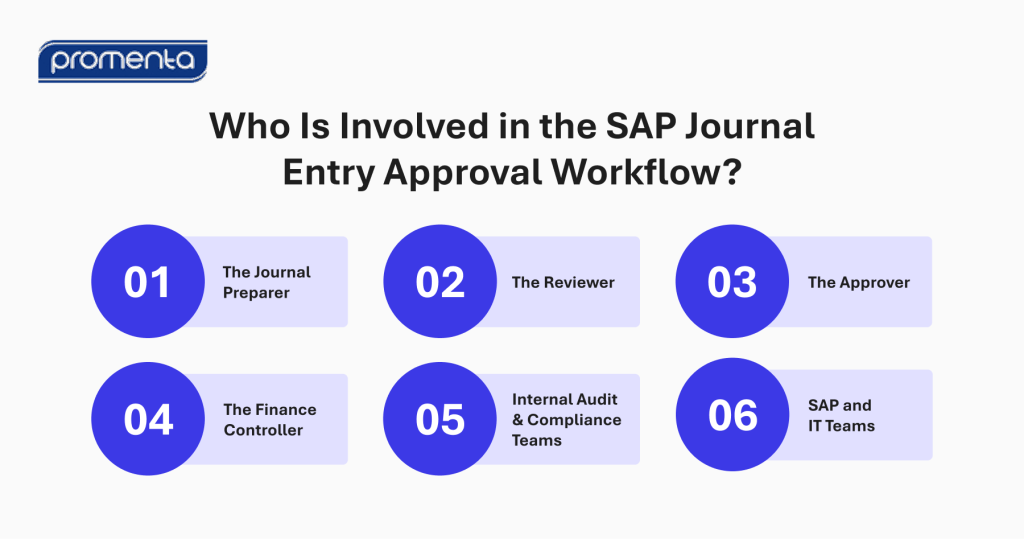
Who Is Involved in the SAP Journal Entry Approval Workflow?

A journal entry approval workflow may involve several different roles. The exact responsibilities will vary depending on the organisation, but the following six roles are commonly relevant.

Who-Is-Involved-in-the-SAP-Journal-Entry-Approval-Workflow_-1024×539-1

1. The Journal Preparer

The preparer is the finance user responsible for creating and submitting the journal.

Their responsibilities may include:

The preparer may use Excel or another familiar tool as part of the preparation process.

2. The Reviewer

The reviewer assesses the journal for accuracy, completeness, and business rationale.

Depending on the organisation’s control framework, the reviewer may be separate from the final approver.

The review process may focus on whether:

3. The Approver

The approver authorises the journal in accordance with organisational policies and approval requirements.

The approver may be responsible for confirming that:

4. The Finance Controller

The Finance Controller may have oversight of the overall journal process.

Their responsibilities may include ensuring that the workflow aligns with:

5. Internal Audit and Compliance Teams

Internal audit and compliance teams may not approve individual journals as part of the normal workflow.

Instead, they may assess whether the controls surrounding the process are effective.

They may be interested in:

6. SAP and IT Teams

SAP and IT teams may support the technical environment in which the workflow operates.

Their responsibilities may include:

A well-designed workflow should provide finance teams with appropriate flexibility to manage defined workflow requirements without requiring every change to become a technical IT project.

How Approval Routing Works

Not every journal requires the same approval path.

A robust workflow should therefore be configurable to reflect the organisation’s financial control framework.

Routing may be based on:

For example, a low-value journal may not require any approval at all or a straightforward single approval, while a high-value or higher-risk journal may require additional levels of review.

Configurable routing helps ensure that:

This also makes it easier for organisations to adapt the workflow as their structures, policies, and requirements change.

Limitations of Native SAP Journal Approval Workflows

While SAP provides extensive functionality for financial management, organisations may still encounter challenges when trying to manage the complete journal entry workflow.

The Excel disconnect

Finance users may be comfortable preparing journal entries in Excel. However, some native workflows may require users to leave this familiar preparation environment and move into rigid transaction codes or external processes to enter journal data and trigger approvals.

This can create friction in the user experience.

The issue is not Excel itself. The challenge is creating a seamless and secure integration between Excel journal preparation and SAP, including a controlled approval process.

Post-approval processing failures

If validation takes place late in the process, errors may only surface after a journal has completed multiple stages of approval.

This can lead to:

Early validation and posting simulation can help identify issues before the journal progresses through the complete approval cycle.

Complex configuration landscapes

Changes to routing rules, approval groups, or delegations may require significant technical involvement in some environments.

For finance teams, this can make it more difficult to adapt the workflow quickly when:

A more flexible approach can allow authorised users to manage relevant approval teams without requiring an IT ticket for every change.

If those questions are difficult to answer, the issue may lie less with journal preparation itself and more with the process surrounding it.

The Role of Automation in SAP Journal Approval

Automation can strengthen the journal approval process in several ways.

Reduced approval delays

Automated routing ensures that journals are directed to the relevant people without relying on manual email coordination.

Improved visibility

Finance teams can see where journals are in the approval lifecycle and identify outstanding actions.

Stronger controls

Approval rules, validation requirements, and segregation-of-duties controls can be built into the workflow.

Better documentation

Supporting documents can remain connected to the journal throughout the process.

Improved auditability

The workflow creates a record of relevant actions, decisions, and approvals.

Reduced manual process interaction

Finance users spend less time manually tracking approvals and following up with stakeholders.

Some workflow solutions can also connect familiar preparation tools directly to the approval process. For example, an Excel Send-to-Workflow function can package the journal request, attachments, and justification and submit them into the controlled workflow.

Self-service configuration can also allow authorised users to manage approval groups, thresholds, and substitute approvers without requiring an IT ticket for every adjustment.

Why Keeping the Workflow Within SAP Matters

The location of the journal workflow is an important consideration for organisations managing sensitive financial information.

Moving critical financial data into disconnected external platforms can introduce:

Keeping the workflow within the SAP environment can provide several advantages.

Reduced movement of sensitive data

Critical financial information can remain within the SAP environment rather than being transferred unnecessarily to an external platform.

Improved security

The workflow can operate within the organisation’s existing SAP environment and security framework.

Consistency with SAP authorisations

The process can align with existing SAP authorisation structures and financial controls.

Centralised control

Journal information, approvals, documentation, and workflow history can remain connected.

Reduced reliance on external systems

Organisations can strengthen journal approval processes without introducing a separate external cloud platform for critical financial workflows.

The key message is simple:

What Makes an Effective SAP Journal Entry Approval Workflow?

When evaluating an SAP journal entry approval workflow, organisations should consider whether the solution provides:

The most effective workflow is one that provides the appropriate balance between control and usability.

It should help finance teams work efficiently while ensuring that the organisation’s financial governance requirements are consistently applied.

Conclusion

An SAP journal entry approval workflow provides a structured framework for managing the journey from journal preparation to final posting.

The process can be summarised as:

Prepare → Validate → Submit → Route → Review → Approve → Post → Audit

Each stage contributes to the overall control and efficiency of the journal process.

A well-designed workflow can help organisations improve:

Importantly, automation does not need to replace familiar preparation tools. For finance teams that use Excel to prepare journal information, the goal is to bring greater structure, visibility, and control to the process that surrounds the spreadsheet.

For organisations evaluating their current journal entry processes, useful questions include:

See Promenta SAP Journal Entry Upload Inside SAP

See how a manual journal moves from Excel preparation to a posted SAP document with live validation, controlled approval, segregation of duties, and a continuous audit trail attached to the entry.

To learn more about how an SAP journal entry workflow can eliminate journal risk and audit findings, strengthen financial controls, improve audit readiness, automate the journal lifecycle for a faster financial close within SAP, explore Promenta’s SAP Journal Entry Workflow Solution.

Frequently Asked Questions

An SAP journal entry workflow is a structured process that manages a journal entry from preparation and submission through validation, approval, posting, and audit trail creation. It helps standardise the process and provide visibility into the status and ownership of each journal. It eliminates journal risk and audit findings, strengthens financial controls, improves audit readiness and automates the journal lifecycle for a faster financial close within SAP. Explore Promenta’s SAP Journal Entry Management Workflow Solution.

Journal entry verification can involve checking that required information is complete, validating the entry against relevant financial rules, and confirming that the journal meets defined approval and control requirements. A workflow solution can also support posting simulation before the journal progresses through the approval process.

Journal approval workflows can be configured according to the organisation’s control requirements. Routing may be based on factors such as company code, value, general ledger account, department, journal type, or other relevant fields.

Manual journal entry approval often relies on email, spreadsheets, and individual follow-up to route and track journals. Automated approval uses a structured workflow to route journals, apply controls, record decisions, track status, and maintain an audit trail.

Journal workflow steps may include preparation, submission, validation, approval routing, review, approval, rejection, amendment, resubmission, posting, and audit reporting. The exact workflow will depend on the organisation’s processes and control requirements.

Finance and control teams can review a journal entry workflow by assessing whether it provides appropriate approval controls, visibility, documentation, segregation of duties, validation, and auditability. They should also assess whether the process supports the organisation’s financial close requirements and SAP environment.