

On this page
Summarize and analyze this article with
Knowing how to upload journal entries in SAP S/4HANA correctly is more than a technical task – it is a significant point of control exposure in the financial close.
Accruals, provisions, recurring month-end postings and correction entries often arrive in volume and under time pressure. A single upload may move dozens or hundreds of line items into the general ledger in a single action.
The upload itself is only one part of the process. The more important questions concern what happens before and after it: how the journal is prepared, when it is validated, who approves it, and whether SAP journal entry controls – including segregation of duties and evidence retention – are enforced as a unified process rather than disconnected steps.
This distinction is important.
While Excel and other structured templates remain practical tools for journal preparation, the control weakness does not necessarily sit in the spreadsheet.
It develops when preparation, validation, approval, posting, and evidence are handled through disconnected steps that are difficult to govern as a unified process.
What is a controlled SAP journal entry upload?
A controlled SAP journal entry upload is a five-stage process – preparation, validation, approval, posting, and evidence retention – executed as a single governed sequence inside SAP.
It ensures only validated, independently approved journals reach the general ledger, with a complete and reportable audit trail attached to each document.
The SAP financial close journal entry process already operates within a limited window.
Journal preparation and posting are among the high-volume activities consuming that time. Where an upload must be reversed and reposted, the finance team spends time that the close window may not have.
This guide explains how to upload journal entries in SAP S/4HANA as a controlled process rather than simply a data-entry task. It covers the main upload approaches, the recommended sequence, the control questions that remain around the standard upload path, and the practices that help keep journals validated, approved, and audit-ready before they reach the ledger.
Why journal entry uploads require control at financial close
A journal entry upload can appear mechanical: populate a template, load the file, and progress to the close. The exposure lies in what the step commits to the ledger.
Manual journals often receive particular audit attention because they depend on judgement and may not originate from the same automated source controls as subledger transactions.
At period-end, volumes increase while the time available for review decreases. Accruals and provisions may depend on estimates.
Recurring entries repeat a familiar structure but require current-period values. Correction postings can surface late, after related balances have already changed.
Where an error reaches the ledger, the operational consequences may include :
- a misstated balance
- additional review and investigation
- a reversal and reposting exercise
- delay to the close timetable
- audit questions that require the team to reconstruct the journal history.
Two considerations decide whether an upload is good to go :
The second is audit readiness: whether the record of preparation, review, approval, posting and supporting evidence is created as part of the process or assembled later from emails, files and system logs.
Built natively on SAP. No external servers, no duplicate financial data.
Two Common Ways to Upload Journal Entries in SAP S/4HANA
Generally, many finance teams handle journal entry creation in SAP S/4HANA in two ways.
Manual entry in SAP
Users can enter journals directly through the relevant SAP finance applications or transactions. This can be appropriate for a small number of straightforward entries.
However, it becomes less practical as volumes grow because line-by-line entry takes time and creates more opportunity for keying errors.
Manual entry is not inherently uncontrolled. The relevant question is whether authorisations, approval requirements and supporting documentation are applied consistently.
If the same person can prepare and post journals without an effective review step, the process may still create a segregation-of-duties risk.
Bulk upload from a structured template
In many scenarios, finance teams prepare accruals, provisions, and recurring month-end entries in a spreadsheet and perform a bulk upload of journal entries to SAP. SAP S/4HANA provides standard upload capability, and some organisations also use a free SAP journal posting Excel upload tool, free SAP journal posting Excel upload tool or specialist journal workflow solutions.
Though the spreadsheet remains useful for calculations, analysis and complex preparation, a static file does not by itself demonstrate that master data was valid when the journal was prepared, if the journal was independently approved, or if the supporting evidence remained connected throughout the process.
How to Upload Journal Entries in SAP S/4HANA: A Five-Step Controlled Sequence
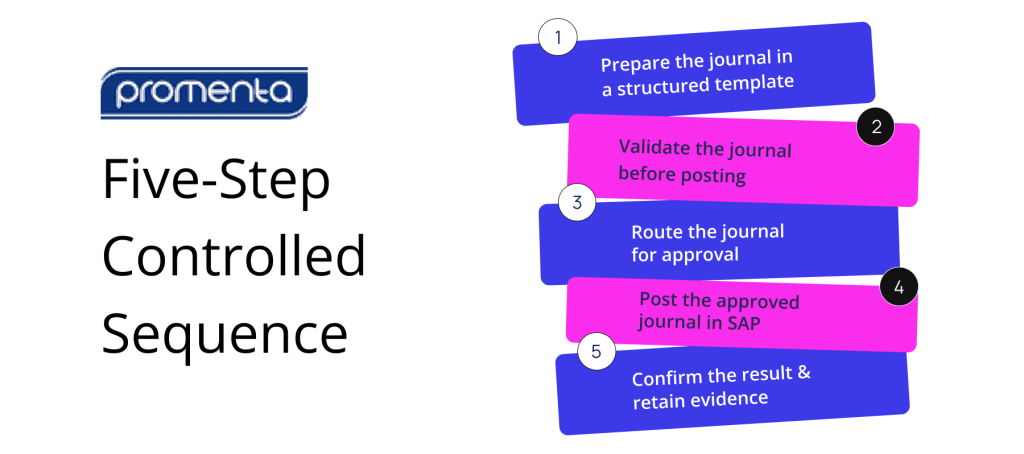
1. Prepare the journal in a structured template
Complete the required header information, such as company code, posting date, document currency, and header text. Then populate the line items, including debit and credit values, G/L accounts, cost objects, etc.
Standardised templates can reduce avoidable rework, particularly for journal types that recur each period. The template should reflect the information needed for that journal rather than forcing every entry through a generic structure.
2. Validate the journal before posting
Ensure the journal is balanced and that accounts, cost objects, posting periods, and other SAP finance requirements are valid.
The timing of validation matters.
Errors identified during preparation are usually easier to correct than errors discovered when the journal is being posted under close pressure.
Depending on the standard SAP capability or solution in use, validation may occur after the file is uploaded into SAP, through a check or posting simulation, or earlier when the journal is still being prepared.
Finance teams should understand exactly which controls run at each stage.
3. Route the journal for approval
Segregation of duties in SAP journal entry processing requires the preparer and approver to remain structurally separated – not just by policy, but through system-enforced controls that prevent the same user from preparing, approving, and posting without an independent review step.
The approval path may depend on company code, journal value, G/L account, business area, or another relevant risk factor.
SAP S/4HANA supports a journal entry approval workflow journal entry approval workflow in applicable editions and releases when correctly configured – but coverage and approval conditions vary by system edition, release, and journal type. The control question is whether the workflow used covers the journal population in scope, applies the required approval conditions, and prevents unauthorized self-approval.
4. Post the approved journal in SAP
Only journals that have passed the required checks and approvals should enter the ledger. Posting creates the SAP accounting document and document number that confirm the transaction has been recorded.
5. Confirm the result and retain evidence
The final record – your SAP journal entry audit trail – should connect each journal to its preparer, reviewer, posting result, and supporting documentation, and be reportable across the complete journal population rather than reconstructed from separate files during an audit.
Together, these five steps form the control chain around the upload.
Where Does the Standard SAP Journal Entry Upload Path Leave Control Gaps?
SAP S/4HANA provides standard functions for uploading general journal entries, checking uploaded data and, in relevant configurations, routing journal entries for verification. It would therefore be wrong to describe the standard environment as having no validation or workflow capability.
The more useful assessment is whether the organisation’s configured process provides continuous control from preparation through posting and evidence.
Validation may remain disconnected from preparation
The standard upload can check journal data after it has been brought into SAP. However, where preparation takes place in a static spreadsheet, the preparer may not have live SAP-dependent validation or current pick lists during journal preparation.
This creates a timing issue. The journal can still be corrected before final posting, but errors may surface later in the close process, after preparation and review effort has already been spent.
Verification workflow may require separate configuration
Journal entry verification capability is available in SAP S/4HANA for supported scenarios, but it must be configured around the organisation’s requirements. Coverage can vary depending on the system edition, release, journal type and process design.
Finance and SAP teams should therefore confirm:
- which uploaded journals enter verification
- which conditions determine the approval route
- whether self-approval is prevented where required
- how rejected or corrected journals are handled
- whether the approval history is easy to report alongside the posted document
The existence of workflow capability is not the same as a fully governed process – the configured outcome matters.
Preparation evidence can sit outside SAP governance
A generic spreadsheet may contain the journal data but not the complete control history. Review comments, approval emails and supporting files can remain in separate locations.
The posted document is visible in SAP, while the reasoning and evidence that preceded it may be fragmented.
This creates an auditability issue. The finance team may be able to prove that a journal was posted, but still need to assemble how it was prepared, reviewed, and approved.
Architecture can introduce an additional governance boundary
Some custom tools and external platforms process or stage journal data outside SAP before sending it back for posting. Depending on the architecture, this may introduce additional infrastructure, interfaces, security controls and data retention arrangements for IT, finance and internal audit to govern.
Although external architecture may be needed in certain scenarios, buyers should understand where financial data is held, which authorisation model applies at each step and how audit evidence remains connected across systems.
Review how Promenta’s SAP-native workflow connects preparation, validation, approval, and audit evidence — with no external server required.
What Does a Governed SAP Journal Entry Upload Process Look Like?
A governed journal upload connects preparation, validation, approval, posting and evidence rather than treating the upload as an isolated event.
Promenta’s SAP Journal Entry Workflow does exactly that.
Preparation takes place in Excel through the Promenta Excel Add-in, which connects the spreadsheet to SAP in real time. This allows finance teams to continue using a familiar preparation environment while drawing on dynamic pick lists and SAP-dependent validation.
Duplication checks and SAP finance validations can be applied before submission, and a simulated posting can identify errors while the journal remains a request rather than a posted document.
Approval routing within the journal entry approval workflow SAP journal entry workflow is configured around relevant request data, such as company code, journal value, or G/L account. Segregation-of-duties rules can prevent a requester from approving their own journal, subject to the organisation’s agreed policy and any explicitly configured thresholds.
Because users submit journals through the controlled workflow, organisations may also be able to restrict direct access to powerful posting transactions for the relevant user population. This can help align system access with the intended approval process rather than relying on policy alone.
Posting takes place inside SAP.
Requests, approvals, posting results, and supporting evidence remain connected and reportable against the journal process. Attachments can be retained in SAP against the finance document, reducing the need to reconstruct the audit history from separate files and emails.
The architectural distinction supports the control model. Promenta runs natively inside SAP ECC or S/4HANA and is designed without an external server or replicated financial dataset in the journal path.
This may reduce the number of interfaces and infrastructure components that the organisation must govern.
Promenta has operated as an SAP partner product since 2002, supporting both on-premises and private cloud deployment options.
One architecture cannot apply to every organisation – each has unique needs. The relevant question is whether the solution fits the organisation’s SAP landscape, control requirements, security model and audit expectations.
Standard SAP capability and what a governed journal workflow adds
| Area | Standard SAP S/4HANA capability | Promenta SAP Journal Entry Workflow |
| Templates | A single generic Excel upload template. | A template manager supporting multiple Excel templates, configured to the entry types a team actually posts. |
| Excel preparation | No SAP functionality inside the spreadsheet; the template is a static file until it is loaded. | An in-sheet Excel Add-in with real-time SAP integration: SAP validation, dynamic pick lists, duplication prevention, and journal risk mitigation during preparation. |
| Workflow & controls | No standard workflow; approval, segregation of duties, and the audit trail have to be designed and built by the customer. | Enterprise journal workflow with segregation of duties, compliance controls, and a reportable audit trail, highly configurable with no coding and native inside S/4HANA. |
| Audit Trail | May be stored separately | Commonly retained outside the journal record |
| Where data is held during the process | Inside SAP | May move through a custom or external tool |
| Audit trail | Audit trail relies on the SAP document record; supporting evidence and approval context are typically held in separate files, emails, or systems outside SAP. | Requests, approvals, posting results, and document attachments remain connected and reportable inside SAP against each journal document, without reconstruction. |
Best practices for journal entry uploads in SAP S/4HANA
The decision to upload journal entries in SAP S/4HANA through a governed sequence – rather than as an isolated file transfer – depends on process design as much as technology.
The following practices apply whichever upload method an organisation uses.
Validate early
Run account, cost object, balance and SAP finance checks before final posting. Earlier validation reduces the likelihood that avoidable errors reach the final stages of the close.
Enforce segregation of duties through access and workflow
Approval should not depend only on an informal expectation that a colleague will review the journal.
Segregation of duties in SAP journal entry processing must be enforced through system access and workflow controls, not policy alone – ensuring the required separation between preparation, approval, and posting is structurally embedded in the process.
Keep evidence connected to the journal
Supporting calculations, explanations and approval history should remain easy to retrieve against the journal. Audit readiness is stronger when evidence is produced by the process rather than assembled afterwards.
Standardise recurring templates
Recurring journals often use the same structure each month even when the values change. Standardised templates can reduce preparation effort and inconsistency without removing the need for current-period validation and approval.
Review the complete configured process
Finance teams should assess the upload app, verification workflow, authorisations, supporting documentation and reporting together. A control may exist in SAP but still leave a gap if it is not configured for the relevant journal population.
Plan for S/4HANA transformation requirements
Where an organisation is moving from SAP ECC to S/4HANA, SAP journal entry workflow design – including templates, approval routing, and controls – should be part of the transformation plan, not retrofitted after go-live.
The objective should be to align governed journal processes with the standard S/4HANA environment rather than create unnecessary competition between them.
Preserve human judgement as automation develops
AI may support journal preparation by proposing recurring entries or suggesting accruals from prior patterns. That does not remove the need for professional finance judgement, current-period evidence and appropriate approval.
More automation does not automatically mean better control.
Conclusion
Uploading journal entries in SAP S/4HANA is only as controlled as the process around the upload. Standard SAP capabilities can support upload, checking and journal entry verification.
Organisations should focus heavily on whether the configured process connects preparation, validation, approval, posting and evidence for the journal population that matters.
A governed process should make it possible to answer the following questions clearly :
- Are journals validated against relevant SAP rules early enough to avoid late rework?
- Can the same person prepare, approve and post a journal, or is segregation of duties enforced?
- Does the approval route reflect journal value, company code, G/L account or other relevant risk factors?
- Are supporting documents and explanations retained with the journal?
- Can finance and internal audit report the complete history without reconstructing it from separate systems?
- Does journal data leave SAP, and if so, what additional governance does that architecture require?
Where the answers demonstrate connected control, the organisation is better placed to support an efficient close and audit-ready evidence.
Where the process depends on disconnected files, emails and late checks, finance teams continue to absorb the control and administrative work each period.
Review how preparation-side validation, approval, segregation of duties and continuous audit evidence can remain attached to the journal without introducing an external server into the process.
Frequently Asked Questions
What are the best practices for uploading journal entries in SAP S/4HANA?
The key best practices for a controlled SAP journal entry upload are:
1. Validate journals against SAP rules before final posting.
2. Enforce segregation of duties through system access and workflow, not policy alone.
3. Retain supporting documents and approval history connected to the journal inside SAP.
4. Standardise recurring templates to reduce preparation inconsistency each period.
5. Assess the entire configured process – upload app, verification workflow, authorisations, and reporting – together as a control chain rather than in isolation.
Does uploading journal entries work the same way in SAP ECC and S/4HANA?
The control principles are similar, but the standard tooling differs. SAP ECC environments commonly rely on manual entry, custom upload programs, or specialist tools for high-volume journal uploads.
SAP S/4HANA provides standard applications for uploading general journal entries and, in supported scenarios, journal entry verification workflows. The exact functions available depend on the edition, release, and configuration.
A governed workflow can provide a consistent control model across both environments by applying the relevant SAP rules and authorisations within each system.
Can journal entry uploads be scheduled for recurring month-end entries?
Recurring accruals and allocations are strong candidates for standardised templates and repeatable preparation. Scheduling can reduce manual effort, but it does not remove the need to validate current-period figures and apply the required approval.
The structure may repeat; the evidence and judgement still belong to the current period.
Is a spreadsheet-based upload sufficient for SOX and audit purposes?
A spreadsheet can be an appropriate preparation tool, but it does not offer complete control over the process by itself.
A spreadsheet-based upload alone is not sufficient for SOX or audit purposes without a governed process around it. SOX and audit requirements depend on the organisation’s control design, but finance teams will generally need to demonstrate validation, appropriate approval, segregation of duties, controlled changes, and retrievable evidence. A spreadsheet-based upload can support those requirements when it operates within a governed process that connects the file to the system of record and its approval history.
Does Promenta replace the standard S/4HANA upload template?
Not necessarily. Promenta is intended to add connected preparation, validation, approval, segregation of duties, and audit evidence around journal processing.
Some teams may continue to use standard SAP upload capability for suitable scenarios while applying a governed workflow where additional preparation-side control, routing, or evidence is required.