
The journal entry approval workflow in SAP S/4HANA is managed through General Journal Entry Verification, a native SAP Fiori capability that routes general ledger entries to designated approvers before posting. Finance users submit the journal; the system evaluates configured conditions and assigns a processor; the approver reviews and either approves or rejects the entry. Once all required verification steps are complete, the journal progresses to posting.
Approving journal entries before they post is a vital financial control.
A journal entry approval workflow in SAP S/4HANA ensures that selected entries are reviewed and authorised before they are posted – using a native mechanism called General Journal Entry Verification, which allows journal entries to be submitted for review and routed to the appropriate approver.
For finance teams, however, approval is only one part of the journal process.
The wider control question is whether the journal has been prepared correctly, validated against SAP standards, supported with the required evidence, routed according to the organisation’s policy and retained with an end-to-end audit trail.
This article explains how the journal entry approval workflow in SAP S/4HANA operates, how the standard verification process is configured and where organisations may need additional journal management controls.
While this article focuses on SAP S/4HANA, the same approval principles and limitations apply to SAP ECC environments, where Promenta also operates natively.
What Is the Journal Entry Approval Workflow in SAP S/4HANA?
SAP S/4HANA uses General Journal Entry Verification – its native general ledger approval mechanism – to manage which journal entries require review before posting.
A finance user creates the journal and submits it for verification. An active workflow evaluates the conditions defined by the organisation and determines whether verification is required and who should receive the journal.
The designated person can then review the accounting information and take the appropriate action.
Where multiple verification steps are required, the journal progresses through the configured sequence before it can complete the process.
This is crucial, because the journal entry approval workflow in SAP S/4HANA is not simply the act of passing a journal from one person to another.
Its value as a financial control comes from ensuring that the required review takes place against a planned approval process, before the journal is allowed to progress through to posting.
It is also useful to distinguish journal upload from journal verification.
SAP provides standard functionality for uploading general journal entries from spreadsheet files. General Journal Entry Verification is the workflow capability used to control review and approval.
Though these are related activities, they are not the same process.
In SAP S/4HANA, General Journal Entry Verification is supported by three Fiori apps: the Verify General Journal Entries app for requesters (F2547), and two processor apps – the Inbox (F2728) and Outbox (F2729). The process is driven by standard Workflow Scenario WS02800046, which organisations configure and extend through the Manage Workflows for General Journal Entry Verification Fiori app.

Journal Entry Approval Workflow in SAP S/4HANA: Step by Step
The exact applications and options available can vary depending on the S/4HANA deployment and release, but the standard approval process broadly follows these stages.
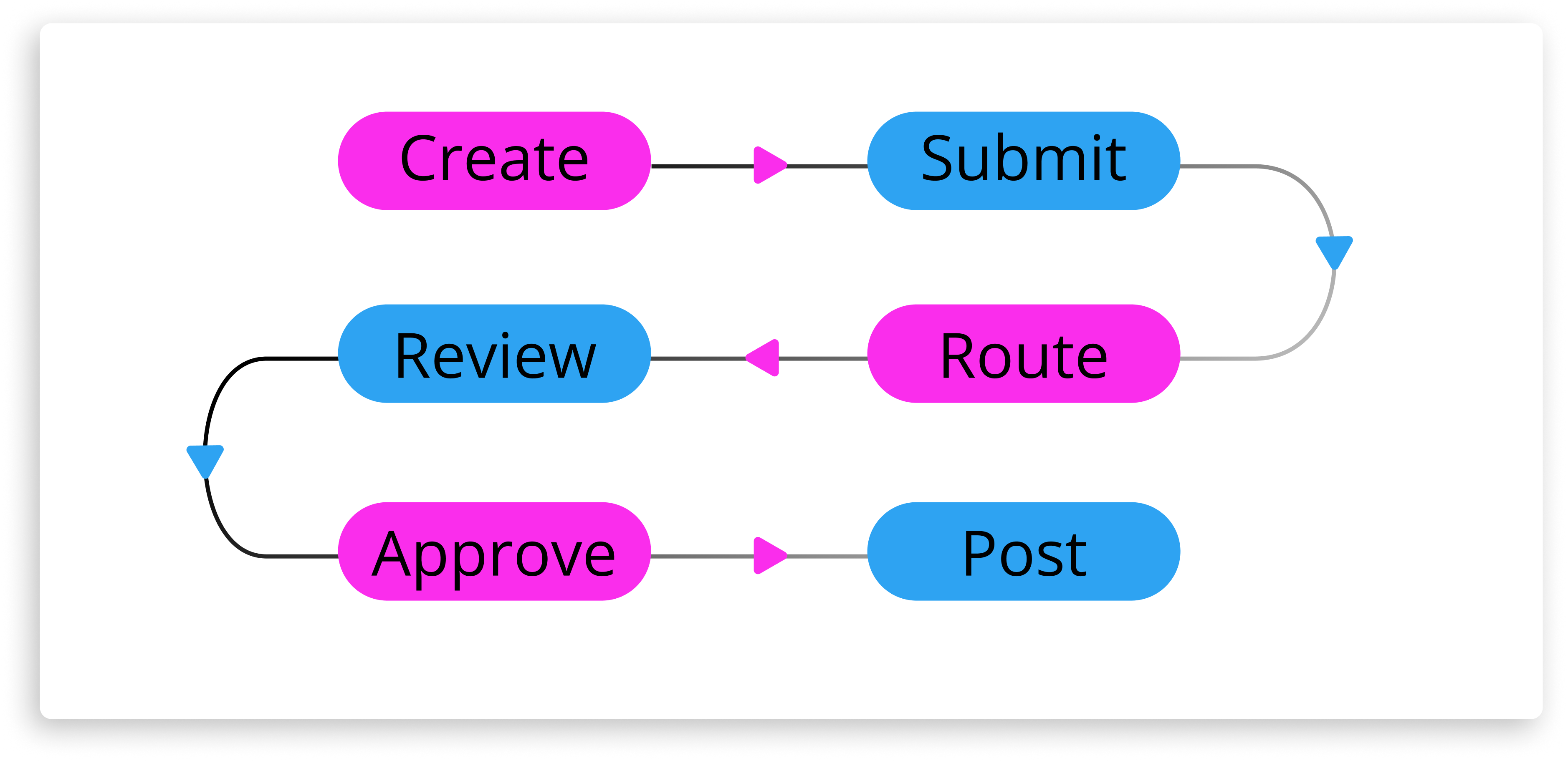
1. Create the journal entry
Step 1: Create the Journal Entry. The requester prepares the journal, including relevant accounts, amounts, company code, and any required supporting information.
The journal contains the accounting information required for posting, including the relevant accounts, amounts, company code and other financial dimensions.
Supporting information may also need to be provided depending on the organisation’s control requirements.
2. Submit the journal for verification
Step 2: Submit for Verification. Once the entry is ready, the requester submits it into the verification process, creating a formal control point before approval or posting.
This creates a formal control point between journal preparation and the subsequent approval or posting activity.
The journal’s status also becomes visible within the workflow rather than relying on separate emails or manual follow-up.
3. SAP determines the approval route
Step 3: SAP Determines the Approval Route. The active workflow evaluates configured conditions and determines which verification process and approver should apply
Approval routing can reflect criteria relevant to the organisation’s financial-control model, such as:
- Company code
- Journal value
- Journal entry type
- Accounting characteristics
- Organisational responsibility
So, different journals can follow different approval paths.
A routine lower-value entry may require a relatively simple process or no approval, while a higher-value or higher-risk journal usually requires additional verification.
4. The approver reviews the journal
Step 4: The Approver Reviews the Journal. The designated approver reviews the journal and the available information to make an informed decision.
The approver needs sufficient information to determine whether the journal is appropriate and the required financial controls have been followed.
Depending on the configured process, the approver may approve, reject, or suspend the journal.
5. The journal progresses towards posting
Step 5: The Journal Progresses Towards Posting. Once all required verification steps are complete, the journal continues through the configured process towards posting.
This connects approval to the journal lifecycle.
Where additional approval levels have been configured, each required step must be completed according to the workflow design.
6. Workflow status remains traceable
Step 6: Workflow Status Remains Traceable. The workflow provides full visibility into the journal’s progress status and the actions taken during verification.
Requesters and finance teams can see whether an entry is awaiting action, approved or rejected. They do not need to maintain a separate approval tracker.
This creates the basic SAP journal approval path:
The next consideration is how that routing is configured around the organisation’s own policies.
How to Configure Journal Entry Approval in SAP S/4HANA: General Journal Entry Verification
SAP journal entry workflow configuration for General Journal Entry Verification is managed through standard SAP workflow-management functionality.
At a high level, organisations define:
- When verification should apply : Preconditions determine which journal entries enter a particular workflow.
- The sequence of verification steps : The workflow defines whether one or multiple review stages are required.
- Who should verify the journal : Responsibility can be determined according to the organisation’s defined approval structure.
- How exceptions should be handled : Workflow behaviour can reflect different outcomes and processing requirements.
- Which workflow is active : The required workflow must be configured and activated for the relevant scenario.
Thus, while SAP provides the framework for journal verification, the organisation still needs to translate its financial-control requirements into that framework i.e. design and build the workflow.
Approval thresholds, responsibilities, organisational structures and exceptions all need to reflect the way the finance function operates.
That becomes particularly relevant as entities, approval responsibilities or control policies change.
What Are the Limitations of SAP S/4HANA Journal Entry Approval?
General Journal Entry Verification provides an important approval control.
But approval is not the complete journal lifecycle.
Finance teams must also consider what happens before the approval starts and what evidence remains after the journal posts.
Excel preparation and SAP upload remain separate considerations
Excel remains widely used for journal preparation because it is practical for calculations, analysis, and complex financial data – a dynamic explored further in our guide to automated vs manual journal entries.
However, the manual entry process is not the biggest challenge here; it is how the spreadsheet connects to SAP.
SAP’s standard functionality for uploading general journal entriesallows journal information to be transferred from a spreadsheet into S/4HANA. This can remove some direct screen entry, but a file-based upload is different from having SAP functionality available inside Excel during preparation.
A deeper Excel-to-SAP process can provide controls while the journal is still being prepared, including:
- SAP-connected picklists
- Validation master-data
- SAP finance validation
- Duplicate prevention
- Controlled submission into workflow
- Status visibility
The distinction is not simply whether SAP can receive an Excel file.
It is the degree of SAP control available before that file reaches the posting stage.
Approval does not replace early validation
Approval establishes whether the journal has been authorised.
Validation establishes whether the journal data itself is acceptable for posting.
A journal can be properly approved and still contain an account, cost object, period or other value that causes a posting problem later.
Therefore, the timing of validation matters.
If a material SAP error is discovered only after a journal has completed several approval stages, the entry may need to be corrected, resubmitted and approved again.
This creates unnecessary work during the close period, when finance teams are already under time pressure.
A better journal entry process offers more control and moves validation closer to preparation.

The aim is to identify avoidable posting problems before approvers spend time reviewing the journal.
Approval and validation serve different purposes.
A controlled process needs both.
Workflow administration can become a practical issue
Approval requirements rarely remain static.
People change roles. Organisations restructure. Approval thresholds are revised. Substitute approvers are needed during leave or close periods.
SAP provides configurable workflow capabilities, but organisations still need to consider how teams can easily maintain day-to-day approval structure.
If every routine change requires technical intervention, workflow administration can become another source of delay.
Finance teams therefore need to assess not only whether a workflow can be configured, but also how easily authorised users can maintain approval teams, thresholds, hierarchies and substitutes as operating requirements change.
High-volume journals need additional handling
Control requirements do not disappear when journal volumes increase.
Month-end and year-end can involve large journals, multiple requests and significant volumes of accounting adjustments moving through a limited close window.
Relevant standard SAP journal upload and verification scenarios can also encounter line-item constraints around large journal documents.
For finance teams processing entries beyond those limits, the process may need to divide the journal into multiple balanced SAP documents while maintaining the required validation and approval controls.
The same issue applies when several journals are prepared together.
Efficiency at close depends on being able to process volume without creating a separate manual control process for each journal.
Approval evidence needs to form part of the wider audit trail
Recording an approval action is useful.
However, for audit purposes, organisations may need to demonstrate substantially more than the final approval – a challenge explored in detail in our guide to SAP journal entry compliance.
That can include :
- Who prepared the journal
- What information supported it
- What validation occurred
- When it was submitted
- Who reviewed and approved it
- Whether it was rejected or amended
- What supporting documentation was attached
- When it was posted
- Whether it was subsequently reversed
Thus, finance teams should also oversee whether the complete journal lifecycle can be reconstructed and reported from a connected control record.
How to Extend SAP Journal Entry Approval Beyond the Native Workflow
For organisations that require more than journal verification alone, Promenta brings Excel preparation, SAP validation, approval, posting and audit evidence into one controlled journal process.
It operates natively within S/4HANA (and ECC) instead of introducing a separate external platform into the core journal path.
SAP-integrated Excel preparation
Finance teams can continue working in Excel using the Promenta Excel Add-In , which connects directly to SAP during journal preparation.
Instead of preparing a disconnected spreadsheet and uploading it at the end, users can access SAP-connected functionality while the journal is being created.
This includes capabilities such as dynamic SAP picklists, add or remove journal fields, validation of all journal data prior to posting, as well as direct workflow submission from Excel ensuring strong compliance control.
Promenta also provides a Template Manager which supports multiple Excel journal templates e.g. GL, AP, AR, Recurring, Intercompany etc.
Even if Excel remains the preparation environment, the controls around it improve and journal risk is diminished.
Validation before approval
Promenta creates a fully validated virtual journal document and runs a full simulated SAP posting at the request stage.
This means the journal is tested against the SAP environment before it moves through approval.
Errors can be returned to the requester while the entry is still being prepared rather than after a multi-stage approval process.
That changes where rework occurs.
An issue corrected before submission creates far less disruption than the same issue discovered immediately before posting.
This capability is possible because Promenta runs natively inside S/4HANA, the system of record, unlike alternative external or cloud based solutions.
Journal-specific configurable workflow
Promenta provides an enterprise journal workflow designed specifically around documented financial approval rules and compliance requirements.
Routing can reflect any combination of fields available in the journal e.g. governed by company code, value, GL etc. and incorporates:
- Multiple approval levels
- Approval hierarchies
- Approval teams
- Substitute approvers
- Segregation of duties
- Self-approval prevention
- Rejection and resubmission
- Mandatory supporting information
The workflow is highly configurable without requiring every routine business change to become a coding exercise.
This allows the approval model to remain aligned with the organization as responsibilities and control requirements change.
Controlled posting and connected audit evidence
A journal does not progress simply because its spreadsheet has been uploaded.
Validation, approval and other required controls form part of the path towards posting.
The resulting journal history retains the preparation, supporting documentation, validation, approvals, rejections, amendments and posting activity as part of a reportable audit record.
This makes audit evidence a product of the process — finance teams do not need to reconstruct it after the close.
SAP-native architecture
Where the workflow operates is also a governance consideration.
Promenta runs within S/4HANA and SAP ECC, allowing the journal process to remain aligned with the organisation’s SAP users, authorisations, master data, finance configuration and security environment.
Sensitive journal information need not be moved to a separate external platform for the core workflow.
For organisations running SAP ECC as well as S/4HANA, the same journal entry approval principles and process limitations apply – Promenta’s solution addresses both environments natively.
This reduces the additional infrastructure, integrations and governance boundaries associated with managing the process across multiple non-SAP systems and environments.
Promenta has partnered with SAP for over 20 years and has been an SAP-certified partner since 2004, developing its Journal Management capabilities specifically for SAP finance environments.
SAP S/4HANA Native Journal Approval vs Promenta Journal Management: Feature Comparison
The table below shows how standard SAP S/4HANA journal approval compares with Promenta Journal Management across the wider journal process.
| Area | Standard SAP S/4HANA | Promenta Journal Management |
|---|---|---|
| Journal upload | Standard spreadsheet-based upload capability | SAP-integrated Excel Add-In capable of deep SAP finance validation in the Excel context, add/remove journal fields, template manager, park, post, send-to-workflow |
| Excel preparation | Spreadsheet prepared for subsequent upload | Excel connected directly to SAP functionality during preparation |
| Templates | Standard upload structure | Template Manager supporting multiple journal templates |
| SAP validation from Excel | File-based upload process | Real-time SAP integration, deep transactional validation and dynamic picklists |
| Approval | General Journal Entry Verification configured for organisational requirements | Pre-built and proven journal-specific configurable workflow software |
| Pre-approval validation | Depends on the standard process and configuration used | Fully validated virtual journal with simulated posting before approval |
| Segregation of duties | Depends on workflow and SAP authorisation configuration | Journal-specific SoD controls and self-approval prevention |
| Workflow administration | Configured within the standard SAP workflow framework | Highly configurable journal workflow with no-code administration |
| High-volume processing | Standard upload and document constraints apply | Supports larger and multiple journals through the controlled process |
| Audit evidence | SAP journal and workflow records | Continuous, reportable preparation-to-posting journal audit trail and external support documentation storage against the SAP finance document |
The standard SAP process may be suitable for organisations requiring a relatively straightforward journal verification model.
A broader journal management solution becomes more relevant when finance teams also need deeper Excel integration, earlier SAP validation, flexible journal-specific routing, high-volume processing and connected audit reporting.
Conclusion
For organisations evaluating a journal entry approval workflow in SAP S/4HANA, the native General Journal Entry Verification mechanism provides an important starting point.
As the journal volumes, entities and approval requirements increase in complexity, finance teams need to consider whether enhanced SAP partner tooling like Promenta is more appropriate to meet their process needs.
The process also needs to address how journals are prepared, when they are validated, how segregation of duties is enforced, how easily approval structures can adapt, and whether supporting evidence remains connected throughout the journal lifecycle.
Promenta extends the process beyond simple upload by connecting Excel preparation, live SAP validation, simulated posting, configurable workflow, controlled posting and audit evidence within SAP.
The result is a journal process designed to identify issues earlier, enforce the required controls before posting and maintain an end-to-end audit trail, supporting SAP finance teams to mitigate journal risk and pass audits.
Frequently Asked Questions
In SAP S/4HANA, a journal entry that requires verification is created and submitted into the General Journal Entry Verification process.
The configured workflow determines which approver or processor should receive the entry. The approver reviews the journal and can take the appropriate action, such as approving or rejecting it.
Once all required verification steps have been completed, the journal can progress through the configured process towards posting.
General Journal Entry Verification is SAP S/4HANA functionality for controlling the review of general journal entries before they progress to the posting stage.
Organisations can configure workflow conditions, verification steps and responsibility according to their financial-control requirements.
Its purpose is to make journal review part of a structured SAP process.
Yes.
SAP S/4HANA provides General Journal Entry Verification functionality that can be configured to route relevant journal entries for approval.
However, journal approval is only one part of journal management.
Organisations may also need to consider Excel preparation, early SAP validation, segregation of duties, supporting documentation, high-volume processing and audit reporting when evaluating the wider process.
Journal entry upload moves prepared journal data into SAP.
Journal entry verification controls whether a journal requires review and approval before it moves to posting.
A complete journal management process goes further by connecting preparation, SAP validation, supporting evidence, approval, posting and audit reporting throughout the journal lifecycle.
Yes.
Finance teams can continue using Excel as the preparation environment while applying a controlled approval process around the journal.
The level of integration depends on the solution used.
With Promenta’s SAP-integrated Excel Add-In, finance users can prepare journals in Excel while accessing SAP-connected picklists and validation, perform a simulated posting and submit the journal into the approval workflow without separating Excel preparation from the wider SAP control process.
General Journal Entry Verification is the native SAP S/4HANA Fiori capability for controlling the review of general ledger journal entries before they are posted. It was introduced with SAP S/4HANA 1709 and is configured through the Manage Workflows for General Journal Entry Verification Fiori app. Organisations can define which entries require review, who should approve them, and how exceptions are handled. Its purpose is to make journal approval part of a structured, traceable SAP process.
For a broader view of how this capability fits into the wider journal management process, see our guide to the SAP journal entry approval workflow.
Yes. Journal entry approval workflow capabilities are available in both SAP S/4HANA and SAP ECC. In the SAP ECC environment, organisations can configure journal entry approval through workflow-based controls similar in principle to S/4HANA General Journal Entry Verification. Promenta’s journal management solution operates natively inside both SAP ECC and S/4HANA, providing the same pre-approval validation, configurable routing, segregation of duties, and audit trail capabilities across both environments.
Recent Comments