Bulk journal entry posting in SAP means preparing, validating, approving and posting many journals at once, often hundreds at period close. The main risks are rushed approvals, errors that surface only at posting, and journals above SAP’s 999 line-item limit. A controlled process simulates every journal before approval and keeps the evidence in SAP.
Why Is High-Volume Journal Processing Hard at Period Close?
Most manual journal activity lands in the final days of the period. Accruals, reclassifications, allocations, and intercompany adjustments arrive together, often aslarge Excel upload files built by several teams. Bulk journal entry posting in SAP is where close delay risk and audit risk meet: the more entries pass through a short window, the less scrutiny each one receives.
That window is tight. APQC’s Open Standards Benchmarking puts the median finance shared services centre at eight days to complete the monthly financial close, across a sample of more than 3,000 organisations. Every journal raised in those days still has to be prepared, reviewed, approved, and posted without weakening the controls that auditors will later test.
High volumes of month-end close journal entries are creating risk if your team recognises any of these:
Large journals split by hand across several uploads, with no single approval record
Approvers working through dozens of emailed spreadsheets in the final days of close
Errors that only surface at posting, which forces rework when time is shortest
No live view of which journals are pending, rejected, or posted
Supporting evidence stored separately from the posted document
How Promenta Handles Bulk Journal Entry Posting in SAP
Promenta’sSAP Journal Entry Workflow applies the same controls to a peak close as to a quiet month. Six capabilities support enterprise journal entry volume:
Excel preparation at scale
Multiple journals per request
Simulation before approval
Users prepare journals in Excel through the Promenta Excel Add-In, with SAP pick lists built in. Entries are validated against live SAP master data during preparation.
Several journals travel in a single request, so one batch of close activity follows one approval path. Approvers review related entries together.
A full posting simulation runs before any request is submitted for approval. Errors surface to the preparer, not the approver.
Large line counts
Rule-based routing
Evidence attached
Journals above SAP’s 999 line-item entry limit are supported within the same controlled request. A large allocation remains one governed item. [Confirm with Promenta: the journal is posted as several SAP documents under one request, so approval and evidence stay together.]
Routing uses any meaningful field in the request, such as company code, G/L account, or journal value. Each journal reaches the right approval group without manual sorting.
Multiple support attachments can be included in each request. They are saved in SAP against the posted finance document.
What Is the SAP 999 Line Item Limit for Journal Entries?
The SAP 999 line item limit restricts a financial document to 999 line items in the entry view, because the line-item number is a three-digit field (SAP KBA 2789867). Posting past it returns error F5727, “Maximum number of items in FI reached,” and the limit cannot be changed in configuration. Payroll accruals, cost allocations, and intercompany recharges are the journals most likely to pass that ceiling at close.
Document splitting adds a further planning consideration. In S/4HANA, document splitting can generate additional line items in the general ledger view, so a large journal has to be planned against the lines splitting will add as well as the lines that were prepared. Lines SAP generates automatically, such as tax lines, also count toward the limit.
Posting more than 999 line items in SAP is now a baseline expectation forSAP journal entry automation software. For a controller, the questions worth asking come after the data is loaded
Is the large journal simulated before it goes for approval?
Is it approved as one request, or broken into fragments with separate sign-offs?
Does its supporting evidence sit against the posted document?
How Should Approval Routing Work at Peak Close Volume?
Batch journal posting with approval depends onapproval workflow routing that keeps working when hundreds of requests arrive in the same week. Automation handles routing, notification, and follow-up. Human approvers remain the accountable control.
At close, routing needs to work without manual chasing:
Simple one-step approval through to multi-team, multi-level approval, based on request data
Approval substitutes and request forwarding when approvers are unavailable
Email notifications and team inboxes
Segregation of duties enforced, so a requester cannot approve their own request unless the rules allow it below an agreed threshold
AI is beginning to help finance teams draft and review journal data. Approval stays with a named person, because auditors test who authorised each entry.
How Do You Keep an Audit Trail for Hundreds of Journals?
Controllers need to know where every journal stands while the close is running. Auditors need proof of how each one was approved afterwards. Promenta reports both from within SAP :
Real-time process reporting on approved, posted, and pending journals
A reportable audit trail of every requester and approver, held within SAP
The option to remove powerful SAP Finance transaction codes from end users, supporting SOX compliance initiatives
Evidence is captured as each journal moves through the process, which reducesthe risk of manual journal entries at the point in the close when volume is highest.
SAP ECC mainstream support ends 2027. See how Promenta keeps journal control inside SAP through the transition.
Why Does SAP-Native Architecture Matter for High Journal Volumes?
In bulk journal entry posting in SAP, every hop between systems multiplies data movement, reconciliation points, and audit scope. Hundreds of journals prepared on anexternal close platform and posted back into SAP become hundreds of records to keep aligned across two systems.
Promenta is built natively on SAP and is an SAP Certified Partner Product. It uses existing SAP users, roles and authorisations, with zero external servers or middleware.
How a bulk upload tool compares with a controlled SAP-native workflow at close :
Area
Bulk upload only
Promenta
Validation timing
Often at posting
Full simulation before approval
Approval
Separate process or add-on
Built into the request
Evidence
Stored elsewhere
Saved against the SAP document
Infrastructure
May need external servers
Zero external servers or middleware
What Does a Controlled Bulk Journal Posting Process Look Like?
Promenta brings bulk journal entry posting in SAP into one governed sequence, at any volume:
Can your team evidence every journal posted in the last three days of close?
Where do errors in large journals surface today?
For teams starting with Excel-to-SAP journal processing, Promenta also offers a free SAP Journal Upload Tool, with the option to extend to full journal workflow capabilities.
1.What is the maximum number of line items in an SAP journal entry?
999 line items in the entry view, because the line-item number field in SAP has three digits. Posting more returns error F5727, “Maximum number of items in FI reached.”
2. What happens when a journal exceeds 999 lines in SAP?
SAP blocks the posting. Finance teams then split the journal, summarise lines, or use a tool that manages the split while keeping one approval record.
3. How many journal entries can be prepared and posted in a single run?
Promenta does not publish a fixed limit on journals per run. Practical throughput at close depends on the SAP system, its configuration, and how teams group related entries into requests. Each journal in a run goes through the same validation, simulation, and approval rules, so higher volume increases the workload but leaves the controls unchanged.
4. How are journals with more than 999 line items handled in SAP?
SAP caps a single financial document at 999 line items in the entry view. Promenta supports journals above that limit, so preparers submit a large journal as one controlled request rather than dividing it into separate uploads by hand. In S/4HANA, teams should also allow for extra general ledger lines created by document splitting.
5. Does high volume change how approval routing works?
No. The same routing rules apply to one journal or several hundred. What changes is the load on approvers in the final days of close. That is where substitutes, request forwarding, and team inboxes keep requests moving when individual approvers are unavailable or overloaded.
Quick answer: An SAP native journal entry workflow runs inside SAP ECC or S/4HANA as an add-on. Journals are validated against live SAP rules, approved through SAP roles and recorded with the SAP posting history in one system. Workflows beside SAP run on SAP BTP or a vendor platform and exchange data with SAP through APIs. That adds data copies, separate permissions and split audit evidence to govern.
Finance leaders are routinely asked to demonstrate who prepared, validated, reviewed, and approved each manual journal. When these activities occur across spreadsheets, workflow applications and SAP, the supporting records may be held in different systems. This can complicate control oversight and audit evidence retrieval.
An SAP native journal entry workflow can keep validation, approval and posting connected to the organisation’s SAP data, authorisations and audit records. Workflows operating beside SAP may provide similar capabilities, but finance teams need to understand how data, controls and evidence move between the application and the ERP.
The assessment begins with four stages: preparation, validation, approval and audit evidence. The location of each determines the controls and dependencies an organisation must manage.
Where Do Journal Preparation, Validation and Approval Happen in an SAP Landscape?
Under its on-stack vs side-by-side extensibility model, SAP describes two broad ways to extend S/4HANA: on-stack, where the extension sits on the S/4HANA system itself, and side-by-side, where it runs on SAP Business Technology Platform (BTP) and connects through APIs.
Journal workflow solutions generally follow three architectural approaches:
Native SAP (on-stack) : the workflow is installed in the SAP system as an add-on and works with SAP's own data, rules, and authorisations
Side-by-side on SAP BTP : an SAP BTP journal entry workflow runs on SAP's platform, outside the S/4HANA core, and exchanges data with it through APIs.
External third-party platform : the workflow runs on the vendor's own servers or cloud, using APIs, connectors or middleware to exchange information with SAP.
For example, SAP offers a Journal Entry Posting Approval content package that runs on SAP Build Process Automation or SAP Workflow Management and posts approved journals to S/4HANA.
SAP supports side-by-side extensibility as part of itsclean core approach. It can be appropriate where organisations need extensions that operate independently of the ERP core. The relevant architectural consideration for journal processing is how each solution handles validation, approval authority and control evidence.
Where each journal stage operates
In short, preparation looks similar in all three models. The differences appear at validation, approval and evidence.
Stage
Native SAP
Side-by-side on BTP
External platform
Preparation
Excel or SAP-based interface, with journal processing in SAP
Excel or BTP application
Excel or vendor application
Validation
Native SAP configuration, with early posting simulation where supported
Native SAP checks through APIs, application-level rules or replicated data
SAP-connected validation or application-level rules, depending on the solution
Approval
SAP users, roles and workflow
BTP application roles, potentially integrated with the organisation’s identity provider
Vendor application roles, with possible integration into enterprise identity management
Evidence
Workflow and posting records maintained in SAP
Records may span BTP and SAP, with integrated reporting possible
Records may span the vendor platform and SAP, with integration depending on the solution
Preparation in Excel is common across all three approaches. The architectural differences become more significant when a journal needs to be checked against SAP rules, authorised for posting and supported with retrievable evidence.
Journal Entry Data Replication: What Moves When the Workflow Sits Beside SAP
A workflow operating outside SAP needs access to relevant financial and reference data. Depending on its design, this may includeG/L accounts,cost centres, profit centres, company codes, posting-period status and user or approver information.
The application may retrieve this information through live APIs, maintain locally cached reference data or replicate selected SAP records into its own environment. These approaches create different data-management requirements.
Where information is copied or maintained separately, finance and IT teams should assess three risks:
Synchronisation risk : Replicated master data or posting-period information may become outdated between refreshes. A journal could pass an external check but fail when SAP applies its current configuration.
Data security risk : Copies of sensitive financial information introduce additional storage locations and access permissions that must be secured and monitored.
Governance risk : Additional data stores require clear responsibilities for classification, retention, deletion, and access management.
IBM’s2026 Cost of a Data Breach Report reports that breaches involving data stored across multiple locations took an average of 256 days to identify and contain, compared with 247 days across all breaches studied. Although these figures do not specifically measure SAP journal platforms, they provide wider context for the security considerations associated with distributed data.
See how Promenta keeps journal preparation, validation, approval and audit evidence inside SAP.
Many external journal automation tools may store copies of SAP data, while others retrieve information through live interfaces without maintaining the same level of persistent replication.
Buyers should establish what data leaves SAP, whether it is stored or only transmitted, how frequently it is refreshed, and which controls protect it. These details are necessary to assess external journal entry platform risk.
Should Journals Be Validated Against Live SAP Rules or a Replicated Copy?
Every journal must satisfy the relevant SAP posting requirements before it enters the ledger. These may include account and cost-object validity, posting-period status, document balancing, and configured validation and substitution rules.
An external workflow may use its own validation rules, replicated reference data, or live SAP interfaces. Where the checks do not cover the full SAP posting logic, certain errors may only become visible when the approved journal is sent to SAP.
For finance teams, this can mean additional corrections, renewed review, or resubmission during the close.
In an SAP native journal entry workflow, a journal can be tested against the same live configuration that will govern its posting.
Promenta applies this by building a fully validated virtual journal document when the request is raised and running a simulated posting before the journal enters approval. The requester can correct errors identified by SAP before the document reaches the approver.
Journal posting simulation in SAP does not remove the need for final controls if relevant SAP configuration or posting conditions change before the document is posted. It does, however, allow many avoidable errors to be addressed earlier in the process.
How Does Journal Approval Inside SAP Use Your Existing Identity Model?
Journal approval inside SAP uses the users, roles and authorisations the organisation already maintains and audits. Approval responsibilities can therefore be managed alongside the SAP access controls governing financial transactions.
When approval operates on another platform, the organisation must also govern that application’s permissions and their relationship to SAP posting rights. This does not necessarily require a completely separate user directory: SAP BTP and third-party applications can integrate with existing identity providers.
Two control considerations remain :
Access management : Changes to an employee's responsibilities or employment status must be reflected in every application through which that person can access or approve journals.
Segregation of duties (SoD) : Approval permissions and SAP posting authorisations need to be assessed together so that users cannot bypass the intended separation of responsibilities.
Where should journal entries be approved?
For an SAP-focused finance function, managing approval within SAP can simplify the relationship between approval authority, posting permissions and audit evidence. Where an external approval platform is used, equivalent controls need to be demonstrated across the connected systems.
Promenta supports requester-versus-approver controls within SAP, including configurable restrictions on self-approval. Organisations can also restrict direct posting authorisations and use a controlled posting process so that users cannot bypass the configured workflow.
Where Is the Journal Audit Trail Stored, and What Does Your Auditor Have to Test?
When approvals run outside the ERP, approval history may be retained on the workflow platform while the resulting financial document and posting history are stored in SAP.
The organisation must be able to establish two things:
Every posted journal followed the approval process required by the organisation's policy.
The journal posted in SAP corresponds to the version that received approval, including any subsequent amendments or exceptions.
Some platforms provide integrated reporting or automated reconciliation across these records. Where they do not, finance teams may need additional procedures to establish a complete audit history.
Location also affects audit scope. UnderPCAOB AS 2601, an auditor considers controls at a service organisation where that organisation’s services form part of the entity’s relevant financial information system.
An externally hosted journal platform may therefore bring service-provider controls into consideration, depending on the nature and significance of the processing performed. A relevant service auditor’s report, such as a SOC 1 report, may be one source of audit evidence.
With a native SAP journal workflow, the requester, approvers, supporting attachments and posting record sit in one system and can be reported together. This can reduce the effort required to assemble and reconcile journal evidence across applications.
Auditors must still assess the relevant controls, including user access, changes to workflow configuration and the effectiveness of approval procedures. An SAP-native deployment does not remove those requirements.
SAP ECC mainstream support ends 2027. See how Promenta keeps journal control inside SAP through the transition.
Journal Entry Integration Architecture: Middleware, Infrastructure and Upgrade Exposure
Journal workflow architecture also affects the systems IT must maintain, secure, and test.
Anapplication operating outside the ERP introduces an additional runtime or service and interfaces connecting it to SAP. The extent of infrastructure management depends on whether the solution is deployed on SAP BTP, operated by a third-party vendor, or maintained internally.
SAP add-on vs. BTP vs. external cloud platform: operational considerations
Consideration
Native SAP add-on
Side-by-side on SAP BTP
External cloud platform
Infrastructure ownership
Existing SAP landscape
SAP BTP environment and SAP connectivity
Vendor-managed application or cloud tenancy and SAP connectivity
Change control
SAP change and transport process
BTP application lifecycle and SAP interface changes
Vendor release cycle plus SAP change process
After an SAP upgrade or support pack
Regression testing within SAP
Testing of relevant SAP interfaces and BTP workflows
Testing of integration compatibility and end-to-end journal processing
A native SAP add-on can reduce dependence on external workflow infrastructure and middleware for the core journal process. It must still be tested for compatibility with relevant SAP upgrades, support packs and configuration changes.
Deployment support should also be checked against the organisation’s target SAP environment. SAP ECC, S/4HANA on-premises andS/4HANA Cloud Private Edition may support different installation and extension approaches.
Questions to Ask Before Choosing an SAP Native Journal Entry Workflow
Finance and SAP teams can use the following five questions to establish where processing and control responsibilities sit in a proposed solution.
Promenta operates natively within SAP, allowing journal preparation, workflow, validation and audit information to be managed through the existing SAP environment.
Does the solution keep journal data, master data references and supporting attachments within SAP, without requiring copies in another application?
Is the journal validated against live SAP configuration before approval?
Are approval permissions governed through the organisation's SAP access and identity controls, with segregation of duties maintained?
Can approval records, supporting documents and SAP posting history be retrieved together without manual reconciliation?
Can the journal workflow be maintained and tested through SAP upgrades without dependencies on additional application environments?
Any answer that is unclear or does not meet the organisation’s requirements warrants further examination of the relevant interfaces, data stores, controls and support responsibilities.
How Promenta Keeps Every Journal Stage Inside SAP ECC and S/4HANA
Promenta’sSAP Journal Entry Workflow is built natively on SAP, so the core journal process, including validation, approval, supporting documentation, and audit reporting, operates within SAP ECC or S/4HANA. Finance teams can continue preparing journals in Excel through the Promenta Add-In or use the web-based interface.
The solution validates journals against live SAP finance rules, performs a posting simulation before approval, and uses configurable routing to manage review and authorisation. Approval decisions, attachments and posting records remain available within SAP for reporting and audit purposes.
As an SAP embedded journal entry tool, Promenta does not require separate external servers or middleware for its core workflow. It is an SAP-certified solution supporting ECC and S/4HANA, including applicable on-premises and private-cloud deployments.
Conclusion: When Does an SAP Native Journal Entry Workflow Make Sense?
The location of journal processing determines which systems must be maintained, which controls need to be coordinated and how finance teams retrieve evidence of each transaction. An SAP native journal entry workflow can bring these responsibilities closer to the system that ultimately records the financial document.
A controlled journal process can follow this sequence entirely within the SAP workflow, while still allowing Excel-based preparation :
Prepare : the journal is prepared in Excel or an SAP-based interface.
Validate : the journal is checked against live SAP configuration, including a posting simulation.
Submit : the validated journal is submitted for approval.
Route : configurable rules send the request to the right approvers.
Review : approvers review the journal and its supporting documents.
Approve : the approval decision is recorded against SAP users and roles.
Post : the approved journal is posted to the SAP ledger.
Audit : the request, approvals and posting record are reported together in SAP.
For finance leaders reviewing their current approach, two questions deserve consideration:
If an auditor requested the approval history for last quarter's posted manual journals, how much work would be required to produce a complete, reconciled record?
When a journal fails a final SAP posting check after approval, which team owns the exception and how is the corrected journal reauthorised?
The answers help reveal whether journal controls operate as one governed process or depend on additional coordination between systems and teams.
1. Where does journal preparation, validation and approval actually happen in an SAP landscape?
Preparation often takes place in Excel or an application interface. Validation and approval may run inside SAP, on SAP BTP or through an external workflow platform. The location and integration design determine which SAP controls can be applied before posting.
2. What are the risks of approving journals in a platform outside SAP?
Potential risks include differences between SAP and application-level validation, inconsistent approval permissions, additional data storage and fragmented evidence. These risks depend on how the platform integrates with SAP and how its controls are configured.
3. Where is the audit trail stored when journal workflow sits outside the ERP?
Approval activity may be stored on the external platform while SAP retains the posting record. Organisations should confirm whether the solution links the approved request to the final SAP document and supports reporting without manual reconciliation.
4. Does an SAP native journal entry workflow require external servers or middleware?
A native SAP add-on does not necessarily require either for its core processing. Promenta’s SAP Journal Entry Workflow operates within the existing SAP environment without an external workflow server or separate middleware.
5. How does an SAP-native architecture change what an auditor can see?
It can allow auditors to retrieve the journal request, approval decisions, supporting documents, and posting history through SAP-based reporting. This simplifies evidence retrieval, although the underlying controls and their operating effectiveness must still be tested.
Quick answer: Recurring journal entries in SAP are postings that repeat each period under a stable arrangement, such as rent, amortisation, accruals and allocations. SAP can schedule them natively, but each entry type needs its own controls: validation, supporting evidence and approval before posting, plus review whenever contracts, estimates or allocation bases change.
A significant share of month-end close journal work comes from entries that recur or follow a predictable cycle. Finance teams prepare accruals, reversals, recurring charges, allocations, and intercompany recharges, often using similar structures from one period to the next. Automating recurring journal entries in SAP can reduce repeated preparation and processing where those patterns are stable.
Reusing an existing journal file is often practical. The control risk arises when the assumptions behind it are no longer valid. An expired contract, an outdated allocation basis, or a missed reversal can go undetected if the review focuses only on whether the entry resembles the previous month’s posting.
In Ledge’s 2025 month-end close benchmark of 100 finance professionals, accruals and provisions ranked second among the most frequently cited time-consuming close activities. Data hygiene, including correcting entries, reallocations, and reclassifications, ranked third, behind account reconciliation.[1]
Rules can handle the predictable part of each entry type, while validation, approval, and supporting evidence apply to every journal in theSAP journal entry workflow. This guide covers each entry type, how it is automated in SAP, and how to judge when a journal type is ready for automation.
What Are the Main Types of Journal Entries at Financial Close?
The main types of journal entries at financial close are recurring, amortisation, accrual, reversal, allocation, and intercompany journals. Their automation potential varies. Stable calculations and repeatable processes lend themselves to rules, while estimates, changes in accounting assumptions, and unusual transactions require closer review.
Recurring journals post the same or similar amounts each period under a fixed arrangement, such as rent or a service contract.
Amortisation journals spread the cost of a prepaid item, such as insurance or a software licence, across the periods it covers.
Accrual journals record expenses incurred but not yet recognised, often using estimates or supporting operational data at period end.
Reversing journals offset previously posted entries, commonly prior-period accruals, to prevent the original amount from being recognised twice when the actual transaction is recorded.
Allocation journals distribute shared costs across cost centres, entities or business units using an agreed basis.
Intercompany journals record transactions between entities in the same group, such as recharges and management fees.
Each entry type also creates a different control requirement:
Entry type
Typical examples
Where the control risk sits
Recurring
Rent, service contracts, fixed fees
Template no longer matches the contract
Amortisation
Prepaid insurance, software licences
Schedule runs past its end date
Accrual
Goods received not invoiced, bonuses, audit fees
Estimate posted without support
Reversal
Prior-period accruals
Missed, duplicated or posted in the wrong period
Allocation
Shared service costs, overheads
Out-of-date basis, very high line counts
Intercompany
Recharges, management fees
Two entities book different amounts
Why Do Recurring Journal Entries in SAP Create Close and Audit Risk?
During a compressed financial close, familiar journals can pass through preparation and approval quickly. Reviewers still need to confirm that the source data, accounting assumptions, and posting authorisations remain valid for the current period.
Does your close show any of these?
Recurring files copied forward each month without checking the underlying agreement
Accrual reversal dates maintained in a separate spreadsheet without a clear link to SAP posting status
Intercompany entries approved separately by each entity with no shared record
Reversals posted by users with broad finance posting authorisations
These practices increase therisk of manual journal entries, leading to late corrections, incomplete approval evidence and difficulty tracing an adjustment back to its original journal. As transaction volumes increase, the effort needed to identify and resolve exceptions can also delay financial close.
See how Promenta keeps journal preparation, validation, approval and audit evidence inside SAP.
How to Automate Recurring Journal Entries in SAP by Entry Type
The appropriate level of automation depends on how each journal is prepared, what can be determined by rules, and which decisions require finance review.
1. Recurring journals: rent, contracts and fixed fees
Recurring journal entries in SAP ECC and S/4HANA are suitable candidates for automation when their accounting structure and underlying arrangements remain consistent. Finance teams can reuse establishedSAP journal entry upload templates through the SAP-integrated Promenta Excel Add-In, using SAP data lookups and real-time validation to check the journal before submission.
SAP also offers native recurring entry functions. In SAP GUI, finance teams create a recurring entry document with FBD1 and post it by running F.14. SAP S/4HANA adds theManage Recurring Journal Entries Fiori app (F1598). These tools handle scheduling and posting. Teams that need preparation checks, evidence and approval before posting typically add a workflow layer.
Reusing an established template reduces repetitive preparation, while finance teams remain responsible for checking changes such as contract renewals, revised fees, or terminated agreements before submission.
2. Amortisation journals: prepaid insurance and licences
Automating amortisation journal entries becomes practical once the underlying schedule is established, with a known total, a defined start date and an agreed period over which the cost is recognised. The periodic charge can then be calculated consistently without reconstructing the schedule at every close.
Where finance teams prepare amortisation entries from a maintained schedule, Promenta can provide the SAP-integrated validation, submission and approval process for those journals. The accuracy of the schedule and any changes to the underlying assumptions remain finance responsibilities.
Review stays on events that change the schedule, such as contract amendments and early terminations, where the remaining balance has to be reassessed rather than rolled forward.
3. Accrual journals: estimates and supporting evidence
Accrual journal entries in SAP often require judgement, making the supporting calculation as important as the amount posted. A bonus provision may rely on payroll data, while an audit fee accrual may be supported by an engagement letter or an agreed fee schedule.
Promenta allows supporting documents to be attached to the journal request and retained with the SAP-based workflow record. Depending on the configured document storage and attachment process, that evidence can also be linked to the posted finance document. This gives approvers access to the basis of the estimate before posting and helps auditors trace the supporting information later.
A reversal is a posting in its own right. If it is missed, the expense is recorded twice once the invoice is posted. If it is duplicated, the expense is understated. If it lands in the wrong period, both periods are misstated. In SAP, accruals posted with FBS1 carry a reversal date, and F.81 reverses them in bulk for the next period, while FB08 reverses individual documents.
Reversing journal entries in SAP therefore require control over the original document, the reversal reason, the posting date and the person authorised to approve the change. SAP provides reversal transactions such as FB08, but organisations may want to restrict direct access where reversal approval is part of theirSAP journal entry compliance controls.
Promenta’s documented reversal workflow allows users to submit eligible, previously posted Promenta journals for reversal. The request records the original document, reversal reason and date, and follows an approval process before the reversal is posted. This gives finance teams a controlled route for reversing eligible entries without providing every requester with broad posting authorisations.[3]
Unlike standard new-journal requests, these reversal requests are not simulated.
5. Allocation journals: cost drivers and high line counts
Allocation journal entries carry two distinct risks: the basis used to calculate them and the number of lines they generate. Finance teams often prepare allocations in Excel using drivers such as headcount, floor space, revenue or resource consumption. The calculation may be well established, but the resulting journal can contain thousands of line items.
Where the relevant functionality is configured, Promenta can handle allocation requests exceeding SAP’s 999-line-item document limit. The solution supports the necessary document handling within a single governed request, reducing the need for finance teams to split and manage large uploads manually.[4]
For standard journal requests, a full simulated posting withlive SAP validation takes place before submission for approval. This allows posting-related errors, including invalid account assignments and other SAP validation failures, to be identified before the approval process begins.
Review stays on the allocation basis itself, which should be revisited whenever headcount, floor space, or usage patterns shift.
6. Intercompany journals: matching both sides
Intercompany journal entries cause problems when the two sides of a transaction mismatch. Differences in amounts, currencies, accounting periods, or supporting references can create additional work during group reconciliation.
Promenta supports intercompany journals and configurable approval routing based on fields such as company code. Where each entity submits a separate request, the workflow can direct that request to the appropriate approval team.
Promenta also supports multiple journal documents within one request. However, those documents follow a single approval path, so the workflow must be designed carefully when the participating entities require distinct approval responsibilities.
SAP Accrual Engine vs Manual Accrual Journals: When to Use Each
SAP S/4HANA Accruals Management includes functionality for purchase order accruals and manual accrual objects. Through the Accrual Engine, organisations can maintain accrual information, calculate periodic amounts, and post entries according to configured rules. SAP also provides options for reviewing and approving periodic accrual amounts.[2]
Some period-end estimates may still be prepared as standalone manual journals. Bonus provisions, professional fees and top-side adjustments are examples, particularly where those scenarios have not been configured within Accruals Management. These journals need a controlled process for preparation, supporting evidence, validation and approval.
The SAP Accrual Engine and Promenta therefore serve complementary purposes. SAP Accruals Management can support the calculation and periodic posting of configured accruals, while Promenta provides a governed workflow for manually prepared journals and eligible reversals. The appropriate combination depends on the organisation’s accrual processes and control requirements.
How Does Rule-Based Journal Approval Work Across Entry Types?
Rule-based journal approval allows organisations to define how requests should be reviewed based on the information they contain. In Promenta, routing within thejournal entry approval workflow can be configured using fields such as company code,G/L account, and journal value, so journals are directed to the appropriate teams according to the organisation’s approval policy.
Workflows can support multiple approval levels, allowing finance teams to apply different review requirements according to transaction value, responsibility and risk. Approvers can:
Set up substitutes when they are out of office
Forward requests to authorised colleagues
Work from email notifications or a shared team inbox
Segregation of duties is another important part of the configuration. Promenta supports different control scenarios, including settings that prevent requesters from approving their own entries. Organisations that require independent approval must select and test the appropriate scenario rather than assume that self-approval is blocked automatically.[5]
Posting and request permissions can also be restricted through the relevant SAP roles, authorisations and Promenta configuration, limiting access to the parts of the business for which users are responsible.
Real-time process reporting, including process ageing by team, shows which accruals, reversals and allocations are approved, posted or still pending, so outstanding items are visible before the books close.
SAP ECC mainstream support ends 2027. See how Promenta keeps journal control inside SAP through the transition.
When Is a Journal Entry Type Ready for Automation?
A journal type is a suitable candidate for automation when its preparation and approval requirements can be expressed through repeatable, well-defined rules. Finance teams can assess this using five criteria, which build on the broader comparison ofautomated vs manual journal entries:
Criterion
What to check
Repeatable logic
The logic repeats each period with stable inputs.
Data-driven calculation
The amount is calculated from data rather than requiring a new judgement each time.
Standardised evidence
The supporting documents can be prepared and reviewed consistently.
Predictable approval
The approver can be determined through defined routing rules.
Meaningful processing volume
The volume or line count makes manual handling a potential close delay risk.
A journal does not need to meet every criterion to benefit from automation. Accruals, for example, may still require a judgement-based estimate, while their validation, evidence collection, routing and approval can follow a standard process.
Over time, AI may support parts of journal preparation or exception identification. Responsibility for accounting estimates, changes in assumptions and unusual transactions should remain with the appropriate finance personnel.
SAP-Native vs External Journal Platforms for High-Volume Journals
High-volume journals make the architecture of the approval process particularly relevant. When entries are prepared or approved outside SAP, as with someSAP journal entry automation software, organisations need reliable mechanisms to move journal data into the ledger and maintain the relationship between the posted transaction and its approval evidence.
Promenta operates natively within SAP, allowing journal preparation, workflow, validation and audit information to be managed through the existing SAP environment.
Consideration
Built natively on SAP
External journal platform
Validation
Live SAP validation and posting simulation before approval for standard journal requests
Depends on the integration and when SAP validation checks are performed
Supporting evidence
Evidence retained with the SAP-based workflow and linked to posted documents according to configuration
Evidence may be retained in the external platform, synchronised with SAP or held in both
Security model
Existing SAP users, roles and authorisations
May require additional access controls and integration governance
Infrastructure
Runs as an SAP add-on without separate servers or middleware for the core journal workflow
Typically requires an additional platform and SAP integration
Promenta is an SAP Certified Partner Product, has been an SAP partner since 2002, and supports SAP ECC, SAP S/4HANA On-Premise andRISE with SAP Private Edition.
Promenta's SAP Journal Entry Management solution provides Excel-based preparation, live SAP validation, configurable approval, posting, and audit evidence within the SAP journal process.
Conclusion: Bringing Every Entry Type Under One Governed Process
Accruals, reversals, recurring, amortisation, allocation and intercompany journals involve different accounting decisions and control requirements. A consistent SAP journal workflow allows organisations to standardise the repeatable stages while retaining appropriate review of estimates, exceptions and changes in underlying assumptions.
The governed journal process follows a defined sequence:
Can you show which accruals were reversed, and in which period?
Who approved last month's allocation, and on what basis?
Do reversals follow the same approval as the original entry?
Frequently Asked Questions
1. Which journal entry types account for most of the manual effort at close?
Accruals, correcting entries, allocations and other recurring adjustments can require significant effort at financial close. Accruals involve calculations, supporting evidence and subsequent review, while recurring and allocation journals create workload through their volume and repeated preparation. The effort increases when finance teams must manually check, route, or reconcile entries across separate files and approval records.
2. How are recurring and rule-based journals automated in SAP?
Automating recurring journal entries in SAP allows finance teams to reuse established journal structures and apply consistent validation and approval rules. Templates reduce repetitive preparation, while workflow rules determine the appropriate review path using information such as company code and transaction value. Automation can reduce manual handling, but the current-period amounts and underlying agreements still need to be verified before posting.
3. How are accruals and their reversals handled across periods?
An accrual is often posted at the end of one accounting period and reversed in the following period when the actual transaction is expected to be recognised. The original posting and reversal should be traceable, with appropriate dates, references and authorisations. A controlled workflow helps finance teams establish whether the reversal occurred as intended and investigate missing, duplicate or incorrectly dated entries.
Features that depend on the surrounding S/4HANA environment may need to be retested, including authentication, authorisations, field mappings, custom logic and Fiori-related functions. One documented limitation is that GLSU document drill-back is unavailable in a Fiori-only environment. The exact impact depends on the GLSU version, S/4HANA release, and deployment configuration.
4. Can allocation and intercompany journals follow the same approval workflow?
Yes, allocation and intercompany journals can be governed through a common journal management framework, with approval routing configured for their business requirements. Allocations may require review of cost drivers and values, while intercompany entries may need approval from different entities. Where multiple documents share one request, finance teams should ensure that its approval path satisfies the applicable company-code and segregation-of-duties requirements.
5. Do automated entry types still require approval before posting?
Automation does not remove the need for an approval policy. Organisations can configure different approval requirements according to journal value, type, account or company code. Lower-risk entries may qualify for threshold-based automatic approval where policy permits, while significant or judgement-based journals may need independent, multi-level review. Segregation-of-duties settings should be configured to prevent self-approval wherever that control is required.
Knowing how to upload journal entries in SAP S/4HANA correctly is more than a technical task – it is a significant point of control exposure in the financial close.
Accruals, provisions, recurring month-end postings and correction entries often arrive in volume and under time pressure. A single upload may move dozens or hundreds of line items into the general ledger in a single action.
The upload itself is only one part of the process. The more important questions concern what happens before and after it: how the journal is prepared, when it is validated, who approves it, and whether SAP journal entry controls – including segregation of duties and evidence retention – are enforced as a unified process rather than disconnected steps.
This distinction is important.
While Excel and other structured templates remain practical tools for journal preparation, the control weakness does not necessarily sit in the spreadsheet.
It develops when preparation, validation, approval, posting, and evidence are handled through disconnected steps that are difficult to govern as a unified process.
What is a controlled SAP journal entry upload?
A controlled SAP journal entry upload is a five-stage process – preparation, validation, approval, posting, and evidence retention – executed as a single governed sequence inside SAP.
It ensures only validated, independently approved journals reach the general ledger, with a complete and reportable audit trail attached to each document.
The SAP financial close journal entry process already operates within a limited window.
Journal preparation and posting are among the high-volume activities consuming that time. Where an upload must be reversed and reposted, the finance team spends time that the close window may not have.
This guide explains how to upload journal entries in SAP S/4HANA as a controlled process rather than simply a data-entry task. It covers the main upload approaches, the recommended sequence, the control questions that remain around the standard upload path, and the practices that help keep journals validated, approved, and audit-ready before they reach the ledger.
Why journal entry uploads require control at financial close
A journal entry upload can appear mechanical: populate a template, load the file, and progress to the close. The exposure lies in what the step commits to the ledger.
Manual journals often receive particular audit attention because they depend on judgement and may not originate from the same automated source controls as subledger transactions.
At period-end, volumes increase while the time available for review decreases. Accruals and provisions may depend on estimates.
Recurring entries repeat a familiar structure but require current-period values. Correction postings can surface late, after related balances have already changed.
Where an error reaches the ledger, the operational consequences may include :
a misstated balance
additional review and investigation
a reversal and reposting exercise
delay to the close timetable
audit questions that require the team to reconstruct the journal history.
Two considerations decide whether an upload is good to go :
The second is audit readiness: whether the record of preparation, review, approval, posting and supporting evidence is created as part of the process or assembled later from emails, files and system logs.
See Promenta's SAP Journal Workflow in Action
Built natively on SAP. No external servers, no duplicate financial data.
Two Common Ways to Upload Journal Entries in SAP S/4HANA
Generally, many finance teams handle journal entry creation in SAP S/4HANA in two ways.
Manual entry in SAP
Users can enter journals directly through the relevant SAP finance applications or transactions. This can be appropriate for a small number of straightforward entries.
However, it becomes less practical as volumes grow because line-by-line entry takes time and creates more opportunity for keying errors.
Manual entry is not inherently uncontrolled. The relevant question is whether authorisations, approval requirements and supporting documentation are applied consistently.
If the same person can prepare and post journals without an effective review step, the process may still create a segregation-of-duties risk.
Bulk upload from a structured template
In many scenarios, finance teams prepare accruals, provisions, and recurring month-end entries in a spreadsheet and perform a bulk upload of journal entries to SAP. SAP S/4HANA provides standard upload capability, and some organisations also use a free SAP journal posting Excel upload tool, free SAP journal posting Excel upload tool or specialist journal workflow solutions.
Though the spreadsheet remains useful for calculations, analysis and complex preparation, a static file does not by itself demonstrate that master data was valid when the journal was prepared, if the journal was independently approved, or if the supporting evidence remained connected throughout the process.
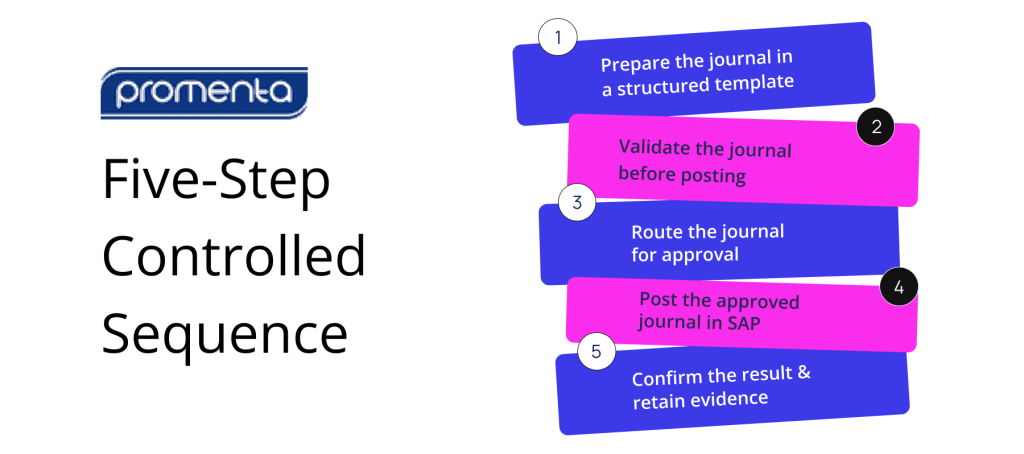
How to Upload Journal Entries in SAP S/4HANA: A Five-Step Controlled Sequence
1. Prepare the journal in a structured template
Complete the required header information, such as company code, posting date, document currency, and header text. Then populate the line items, including debit and credit values, G/L accounts, cost objects, etc.
Standardised templates can reduce avoidable rework, particularly for journal types that recur each period. The template should reflect the information needed for that journal rather than forcing every entry through a generic structure.
2. Validate the journal before posting
Ensure the journal is balanced and that accounts, cost objects, posting periods, and other SAP finance requirements are valid.
The timing of validation matters.
Errors identified during preparation are usually easier to correct than errors discovered when the journal is being posted under close pressure.
Depending on the standard SAP capability or solution in use, validation may occur after the file is uploaded into SAP, through a check or posting simulation, or earlier when the journal is still being prepared.
Finance teams should understand exactly which controls run at each stage.
3. Route the journal for approval
Segregation of duties in SAP journal entry processing requires the preparer and approver to remain structurally separated – not just by policy, but through system-enforced controls that prevent the same user from preparing, approving, and posting without an independent review step.
The approval path may depend on company code, journal value, G/L account, business area, or another relevant risk factor.
SAP S/4HANA supports a journal entry approval workflow journal entry approval workflow in applicable editions and releases when correctly configured – but coverage and approval conditions vary by system edition, release, and journal type. The control question is whether the workflow used covers the journal population in scope, applies the required approval conditions, and prevents unauthorized self-approval.
4. Post the approved journal in SAP
Only journals that have passed the required checks and approvals should enter the ledger. Posting creates the SAP accounting document and document number that confirm the transaction has been recorded.
5. Confirm the result and retain evidence
The final record – your SAP journal entry audit trail – should connect each journal to its preparer, reviewer, posting result, and supporting documentation, and be reportable across the complete journal population rather than reconstructed from separate files during an audit.
Together, these five steps form the control chain around the upload.
Where Does the Standard SAP Journal Entry Upload Path Leave Control Gaps?
SAP S/4HANA provides standard functions for uploading general journal entries, checking uploaded data and, in relevant configurations, routing journal entries for verification. It would therefore be wrong to describe the standard environment as having no validation or workflow capability.
The more useful assessment is whether the organisation’s configured process provides continuous control from preparation through posting and evidence.
Validation may remain disconnected from preparation
The standard upload can check journal data after it has been brought into SAP. However, where preparation takes place in a static spreadsheet, the preparer may not have live SAP-dependent validation or current pick lists during journal preparation.
This creates a timing issue. The journal can still be corrected before final posting, but errors may surface later in the close process, after preparation and review effort has already been spent.
Verification workflow may require separate configuration
Journal entry verification capability is available in SAP S/4HANA for supported scenarios, but it must be configured around the organisation’s requirements. Coverage can vary depending on the system edition, release, journal type and process design.
Finance and SAP teams should therefore confirm:
which uploaded journals enter verification
which conditions determine the approval route
whether self-approval is prevented where required
how rejected or corrected journals are handled
whether the approval history is easy to report alongside the posted document
The existence of workflow capability is not the same as a fully governed process – the configured outcome matters.
Preparation evidence can sit outside SAP governance
A generic spreadsheet may contain the journal data but not the complete control history. Review comments, approval emails and supporting files can remain in separate locations.
The posted document is visible in SAP, while the reasoning and evidence that preceded it may be fragmented.
This creates an auditability issue. The finance team may be able to prove that a journal was posted, but still need to assemble how it was prepared, reviewed, and approved.
Architecture can introduce an additional governance boundary
Some custom tools and external platforms process or stage journal data outside SAP before sending it back for posting. Depending on the architecture, this may introduce additional infrastructure, interfaces, security controls and data retention arrangements for IT, finance and internal audit to govern.
Although external architecture may be needed in certain scenarios, buyers should understand where financial data is held, which authorisation model applies at each step and how audit evidence remains connected across systems.
See how Promenta closes these control gaps inside SAP
Review how Promenta’s SAP-native workflow connects preparation, validation, approval, and audit evidence — with no external server required.
What Does a Governed SAP Journal Entry Upload Process Look Like?
A governed journal upload connects preparation, validation, approval, posting and evidence rather than treating the upload as an isolated event.
Promenta’s SAP Journal Entry Workflow does exactly that.
Preparation takes place in Excel through the Promenta Excel Add-in, which connects the spreadsheet to SAP in real time. This allows finance teams to continue using a familiar preparation environment while drawing on dynamic pick lists and SAP-dependent validation.
Duplication checks and SAP finance validations can be applied before submission, and a simulated posting can identify errors while the journal remains a request rather than a posted document.
Approval routing within the journal entry approval workflow SAP journal entry workflow is configured around relevant request data, such as company code, journal value, or G/L account. Segregation-of-duties rules can prevent a requester from approving their own journal, subject to the organisation’s agreed policy and any explicitly configured thresholds.
Because users submit journals through the controlled workflow, organisations may also be able to restrict direct access to powerful posting transactions for the relevant user population. This can help align system access with the intended approval process rather than relying on policy alone.
Posting takes place inside SAP.
Requests, approvals, posting results, and supporting evidence remain connected and reportable against the journal process. Attachments can be retained in SAP against the finance document, reducing the need to reconstruct the audit history from separate files and emails.
The architectural distinction supports the control model. Promenta runs natively inside SAP ECC or S/4HANA and is designed without an external server or replicated financial dataset in the journal path.
This may reduce the number of interfaces and infrastructure components that the organisation must govern.
Promenta has operated as an SAP partner product since 2002, supporting both on-premises and private cloud deployment options.
One architecture cannot apply to every organisation – each has unique needs. The relevant question is whether the solution fits the organisation’s SAP landscape, control requirements, security model and audit expectations.
Standard SAP capability and what a governed journal workflow adds
Area
Standard SAP S/4HANA capability
Promenta SAP Journal Entry Workflow
Templates
A single generic Excel upload template.
A template manager supporting multiple Excel templates, configured to the entry types a team actually posts.
Excel preparation
No SAP functionality inside the spreadsheet; the template is a static file until it is loaded.
An in-sheet Excel Add-in with real-time SAP integration: SAP validation, dynamic pick lists, duplication prevention, and journal risk mitigation during preparation.
Workflow & controls
No standard workflow; approval, segregation of duties, and the audit trail have to be designed and built by the customer.
Enterprise journal workflow with segregation of duties, compliance controls, and a reportable audit trail, highly configurable with no coding and native inside S/4HANA.
Audit Trail
May be stored separately
Commonly retained outside the journal record
Where data is held during the process
Inside SAP
May move through a custom or external tool
Audit trail
Audit trail relies on the SAP document record; supporting evidence and approval context are typically held in separate files, emails, or systems outside SAP.
Requests, approvals, posting results, and document attachments remain connected and reportable inside SAP against each journal document, without reconstruction.
Best practices for journal entry uploads in SAP S/4HANA
The decision to upload journal entries in SAP S/4HANA through a governed sequence – rather than as an isolated file transfer – depends on process design as much as technology.
The following practices apply whichever upload method an organisation uses.
Validate early
Run account, cost object, balance and SAP finance checks before final posting. Earlier validation reduces the likelihood that avoidable errors reach the final stages of the close.
Enforce segregation of duties through access and workflow
Approval should not depend only on an informal expectation that a colleague will review the journal.
Segregation of duties in SAP journal entry processing must be enforced through system access and workflow controls, not policy alone – ensuring the required separation between preparation, approval, and posting is structurally embedded in the process.
Keep evidence connected to the journal
Supporting calculations, explanations and approval history should remain easy to retrieve against the journal. Audit readiness is stronger when evidence is produced by the process rather than assembled afterwards.
Standardise recurring templates
Recurring journals often use the same structure each month even when the values change. Standardised templates can reduce preparation effort and inconsistency without removing the need for current-period validation and approval.
Review the complete configured process
Finance teams should assess the upload app, verification workflow, authorisations, supporting documentation and reporting together. A control may exist in SAP but still leave a gap if it is not configured for the relevant journal population.
Plan for S/4HANA transformation requirements
Where an organisation is moving from SAP ECC to S/4HANA, SAP journal entry workflow design – including templates, approval routing, and controls – should be part of the transformation plan, not retrofitted after go-live.
The objective should be to align governed journal processes with the standard S/4HANA environment rather than create unnecessary competition between them.
Preserve human judgement as automation develops
AI may support journal preparation by proposing recurring entries or suggesting accruals from prior patterns. That does not remove the need for professional finance judgement, current-period evidence and appropriate approval.
More automation does not automatically mean better control.
Conclusion
Uploading journal entries in SAP S/4HANA is only as controlled as the process around the upload. Standard SAP capabilities can support upload, checking and journal entry verification.
Organisations should focus heavily on whether the configured process connects preparation, validation, approval, posting and evidence for the journal population that matters.
A governed process should make it possible to answer the following questions clearly :
Are journals validated against relevant SAP rules early enough to avoid late rework?
Can the same person prepare, approve and post a journal, or is segregation of duties enforced?
Does the approval route reflect journal value, company code, G/L account or other relevant risk factors?
Are supporting documents and explanations retained with the journal?
Can finance and internal audit report the complete history without reconstructing it from separate systems?
Does journal data leave SAP, and if so, what additional governance does that architecture require?
Where the answers demonstrate connected control, the organisation is better placed to support an efficient close and audit-ready evidence.
Where the process depends on disconnected files, emails and late checks, finance teams continue to absorb the control and administrative work each period.
See a governed journal upload inside SAP
Review how preparation-side validation, approval, segregation of duties and continuous audit evidence can remain attached to the journal without introducing an external server into the process.
What are the best practices for uploading journal entries in SAP S/4HANA?
The key best practices for a controlled SAP journal entry upload are:
1. Validate journals against SAP rules before final posting.
2. Enforce segregation of duties through system access and workflow, not policy alone.
3. Retain supporting documents and approval history connected to the journal inside SAP.
4. Standardise recurring templates to reduce preparation inconsistency each period.
5. Assess the entire configured process – upload app, verification workflow, authorisations, and reporting – together as a control chain rather than in isolation.
Does uploading journal entries work the same way in SAP ECC and S/4HANA?
The control principles are similar, but the standard tooling differs. SAP ECC environments commonly rely on manual entry, custom upload programs, or specialist tools for high-volume journal uploads.
SAP S/4HANA provides standard applications for uploading general journal entries and, in supported scenarios, journal entry verification workflows. The exact functions available depend on the edition, release, and configuration.
A governed workflow can provide a consistent control model across both environments by applying the relevant SAP rules and authorisations within each system.
Can journal entry uploads be scheduled for recurring month-end entries?
Recurring accruals and allocations are strong candidates for standardised templates and repeatable preparation. Scheduling can reduce manual effort, but it does not remove the need to validate current-period figures and apply the required approval.
The structure may repeat; the evidence and judgement still belong to the current period.
Is a spreadsheet-based upload sufficient for SOX and audit purposes?
A spreadsheet can be an appropriate preparation tool, but it does not offer complete control over the process by itself.
A spreadsheet-based upload alone is not sufficient for SOX or audit purposes without a governed process around it. SOX and audit requirements depend on the organisation’s control design, but finance teams will generally need to demonstrate validation, appropriate approval, segregation of duties, controlled changes, and retrievable evidence. A spreadsheet-based upload can support those requirements when it operates within a governed process that connects the file to the system of record and its approval history.
Does Promenta replace the standard S/4HANA upload template?
Not necessarily. Promenta is intended to add connected preparation, validation, approval, segregation of duties, and audit evidence around journal processing.
Some teams may continue to use standard SAP upload capability for suitable scenarios while applying a governed workflow where additional preparation-side control, routing, or evidence is required.
Manual journal entries are an essential part of financial reporting. They allow finance teams to record accruals, corrections, reclassifications, provisions and other transactions that may not originate from a standard source document.
However, this flexibility also makes manual journals a critical area of financial control.
Unlike a payment supported by an invoice or a goods receipt connected to a purchase order, a manual journal may begin with a finance user deciding the amount, account, cost object, posting period and accounting treatment.
This does not mean that every manual journal is inherently high risk. Nor does it mean that organisations should simply try to eliminate manual journals.
Rather, the focus lies in what happens around the journal.
How is the information validated? Who reviews and approves it? Can the preparer also post the entry? Is supporting documentation retained alongside the journal? Can the organisation demonstrate the complete history of the transaction during an audit?
The risk of manual journal entries in SAP therefore depends less on the number of journals being processed and more on where the controls are applied.
If controls operate only after a journal has posted, the organisation may be able to detect a problem. If the controls operate during preparation and approval, the organisation has a better opportunity to prevent the problem from reaching the ledger.
Why the Risk of Manual Journal Entries in SAP Requires Preventive Controls
Manual journals are a critical part of the financial close. They allow finance teams to record accruals, reclassifications, provisions, intercompany entries, corrections and other adjustments that require professional judgement.
The challenge is not the journal itself. It is the SAP journal entry upload process – how the journal moves from Excel preparation into the SAP general ledger, and what controls, validation, and approval exist along that path.
While many organisations use their own Excel upload process to post journals, in many SAP environments, finance teams still rely on one of two methods :
Manual journal data entry directly into standard SAP finance screens or SAP S/4HANA Universal Journal applications.
Custom or generic Excel upload tools that do not provide an integrated Excel Add-In with the SAP validation, approval and control capabilities required to reduce journal risk.
The problem is that neither of these methods necessarily provides a controlled process around preparation, validation, approval, supporting evidence, and auditability.
Promenta SAP Journal Entry Upload is designed to replace these approaches with a controlled, SAP-native process Finance users can continue preparing journals in Excel, while live SAP validation, posting simulation, approval routing, segregation of duties and audit evidence remain connected to the entry throughout its lifecycle.
Beyond enabling finance teams to upload journals more quickly, Promenta ensures each journal is validated, authorised and fully documented before it becomes a posted SAP financial document.
What Is SAP Journal Entry Upload?
SAP journal entry upload is the process of moving a manually prepared journal entry from Excel into the SAP general ledger. A controlled SAP Journal Posting, Excel Upload Tool includes live SAP validation, posting simulation, enforced approval, segregation of duties, and a continuous audit trail – all operating inside SAP ECC or S/4HANA without external servers or replicated financial data.
Why SAP Journal Entry Upload Requires Stronger Controls Than Manual Posting
The scale of manual journal posting in SAP remains significant across enterprise finance functions.
Research published in 2026 across finance shared-service teams found that only approximately 2% of organisations described their close as fully automated. This means manual journal preparation and posting are widely practised across enterprise finance functions.
Whether the complete process can be reconstructed during an audit
Promenta Journal Posting, Excel Upload Tool is designed to create this controlled path from Excel preparation through to posting and audit.
What a Controlled SAP Journal Entry Upload Replaces
Before evaluating a controlled upload process, it is important to understand the two methods it is intended to replace.
1. Manual Entry into Standard SAP Finance Screens
In SAP ECC, users may enter journals through standard posting or parking transactions such as FB50, FB01, or FV50.
In SAP S/4HANA, finance teams may use standard journal entry applications that post into the Universal Journal.
SAP validates the entry when it is submitted for posting. However, direct screen entry does not necessarily provide:
A structured journal preparation process
Validation before the user reaches the posting stage
An enforced approval workflow
Mandatory supporting documentation
A controlled separation between preparation and posting
A complete record of the decisions preceding the posting
The user entering the journal may also hold standing access to post it.
This creates an important segregation-of-duties issue. A user may be able to prepare and post the same journal without independent approval being enforced through the system.
An approval may still take place through email or another informal process. However, if the journal can be posted regardless of whether that approval occurred, the approval is not operating as a preventive control.
2. Custom or Generic Excel Upload Tools
Basic Excel upload tools make journal preparation easier by allowing finance users to structure entries in a spreadsheet and transfer them into SAP.
While these tools may confirm that the file is structurally complete, they do not confirm if the journal complies with the live finance rules SAP will apply when the document is posted.
Custom or generic tools may not provide:
An SAP-integrated Excel Add-In
Live SAP picklists
Real-time SAP finance validation
Full simulated posting before submission
SAP-native approval routing
Segregation-of-duties enforcement
Mandatory supporting evidence
A continuous SAP audit trail
Where approval exists, it may still be managed through email and retained separately from the journal.
The spreadsheet may improve preparation efficiency, but the controls surrounding the journal largely remain manual.
SAP ECC mainstream support ends 2027. See how Promenta keeps journal control inside SAP through the transition.
What Is the Difference Between a Format Check and Live SAP Validation?
Validation is one of the most important distinctions between a basic Excel upload and Promenta SAP Journal Entry Upload.
File and Format Validation
A format check determines whether the spreadsheet is structurally suitable for upload.
It may confirm that :
Columns are mapped correctly
Required fields are populated
Data follows the expected structure
The file can be submitted to the interface
Though these checks are useful, a format check says nothing about whether the entry will actually post.
Even a correctly formatted journal may contain an invalid general ledger account, an incorrect cost object, an unavailable posting period, or another issue that causes it to fail when it reaches the SAP environment.
Validation Against Live SAP Rules
SAP journal entry validation examines the entry against the live SAP environment, including the master data, finance configuration, and posting rules that will govern the actual posting.
Depending on the organisation’s configuration, this may include:
General ledger account validation
Chart-of-accounts checks
Cost centre validation
Profit centre validation
Company code validation
Posting-period status
Tax determination
Tolerance rules
Document balancing
SAP substitutions
Configured finance validations, including GBB0
This is fundamentally different from merely validating the spreadsheet structure.
The journal is tested against the same live data and financial rules that will govern the eventual posting.
Why the Timing of Validation Matters
The challenge with manual entry into SAP and basic Excel upload tools is that in both, errors surface too late, usually close to posting.
By that stage:
The preparer may believe the journal is complete
Supporting information may already have been gathered
Informal approval may already have taken place
The journal may need to be corrected and resubmitted
Close activity may already be under significant time pressure
Promenta moves this validation earlier.
Promenta SAP Journal Entry Upload uses a fully validated virtual journal document and runs a full simulated posting at the request stage. So, the requester can see the errors SAP would raise before the journal is submitted for approval.
This allows structural, master-data and field-level issues to be corrected while the journal is still being prepared.
Thus, it allows finance teams to prevent avoidable errors from progressing to approval rather than discovering them at the final posting stage.
How an SAP-Integrated Excel Add-In Improves Journal Upload Control
Excel remains a practical and familiar preparation tool for finance teams.
It supports calculations, analysis, large datasets, and the preparation of complex journals. Replacing Excel is not always the most viable option.
An Excel journal upload to SAP is practical and familiar. The question is not whether to use Excel, but what connects it to SAP and whether that connection includes live validation, approval routing, and audit control. Organisations looking to move beyond manual screen entry can start with Promenta’s free SAP Excel upload tool as an entry point before adopting full workflow controls.
Promenta provides an SAP-integrated Excel Add-In that allows finance users to prepare journals using a familiar interface while accessing SAP-aware controls.
The Add-In supports:
Live SAP picklists
Validation against current SAP data
SAP finance-rule validation
Submission into the approval workflow
Supporting attachments
Status visibility
Controlled progression towards posting
The Add-In turns Excel into the controlled preparation point for an SAP journal request.
This connects the approval policy to the underlying SAP authorisation structure.
See Promenta's SAP Journal Workflow in Action
Built natively on SAP. No external servers, no duplicate financial data.
Because the document posts only after the required approvals are complete, the organisation can also remove access to sensitive finance posting transactions from everyday users.
Segregation of duties becomes an enforced property of the workflow rather than a procedure dependent on individual behaviour.
Why SAP Journal Entry Upload Should Run Inside SAP
The location of the upload determines whether journal data, validation, approvals and audit evidence remain within SAP or must be managed across additional systems.
When preparation, validation, approval and posting remain connected to SAP, the process can use the organisation’s existing:
SAP users
Roles and authorisations
Segregation-of-duties framework
Master data
Finance configuration
Security controls
Operational support procedures
Audit environment
Sensitive financial information does not need to be replicated into an external platform for the core process.
By contrast, an external application may introduce:
A duplicate copy of journal data
Additional infrastructure
A separate user-administration model
Additional integrations
Another security boundary
Additional audit and compliance scope
Integration testing during SAP upgrades
Promenta operates inside SAP ECC and SAP S/4HANA without external servers, middleware or replicated financial data for the core journal process. Deployment can remain on-premises or within the organisation’s private-cloud SAP environment.
The journal is validated against the same finance rules and posted into the same ledger to which it belongs.
This helps preserve one connected control environment throughout the upload process.
How Promenta Replaces Both Existing Methods
A controlled SAP journal entry upload combines the familiar elements of Excel preparation and SAP posting within one governed process, keeping validation, approval, and audit evidence connected throughout.
A finance user continues to prepare the journal in Excel.
The difference is what happens around that preparation:
The Promenta Excel Add-In connects directly to SAP.
Live SAP picklists support more accurate preparation.
The journal is validated against current SAP data and finance rules.
A full posting is simulated before submission.
Supporting documentation is attached to the request.
The journal is submitted into an SAP-native workflow
Approvals are routed according to the organisation’s financial-control requirements.
Segregation of duties is enforced.
The document posts only when all required approvals are complete.
The full request, approval and posting history remains reportable inside SAP.
Promenta effectively replaces direct screen entry or custom Excel upload tools by providing an integrated Excel Add-In with live SAP validation, workflow and audit controls rather than relying on a file-format check.
A Comparative Mapping of the Three Approaches
Area
Direct Entry into SAP Screens
Custom or Generic Excel Upload
Promenta SAP Journal Entry Upload
Where the journal is prepared
Entered directly into the SAP posting screen
Prepared in a spreadsheet without a fully SAP-aware Add-In
Prepared in Excel through the SAP-integrated Promenta Add-In
When SAP validation occurs
At the point of posting
Usually limited to file and format checks before SAP posting
Against live SAP rules during preparation, with simulated posting before submission
Approval and segregation of duties
May rely on standing posting access and informal review
Approval commonly retained in email or another external process
Approval routed and enforced inside SAP
Supporting documentation
May be stored separately
Commonly retained outside the journal record
Attached to the controlled journal request
Where data is held during the process
Inside SAP
May move through a custom or external tool
Remains inside the SAP environment
Audit trail
May be divided between the ledger, emails and other evidence
May be divided between spreadsheets, emails and SAP
Continuous and reportable inside SAP
When errors are identified
At posting
Commonly at posting
Before submission and approval
SAP GUI dependency
Required for standard transactions
Depends on the tool
Promenta does not require SAP GUI
Primary objective
Enter and post the journal
Make spreadsheet upload more efficient
Control preparation, validation, approval, posting and audit
How SAP Journal Entry Upload Handles High-Volume and Month-End Activity
Control should not weaken when journal volumes increase.
Month-end and year-end close may involve large journals, recurring activity, and multiple journal requests that need to move through the process within a limited period.
The solution also supports complex, high-volume journal activity through the same controlled path used for individual entries.
Where a journal contains more than SAP’s standard 999 line-item limit, Promenta can automatically divide the entry into multiple balanced SAP documents. For example, a journal containing 3,000 line items can be split across the required balancing accounts and then posted through the same controlled process.
Finance teams can also prepare multiple journals within a single Excel sheet. Promenta identifies and processes each journal as a separate SAP document, allowing several journals to be validated, approved and posted together without requiring a separate upload process for each one.
How a Controlled SAP Journal Entry Upload Speeds Up the Financial Close
A faster financial close goes way beyond simply accelerating the spreadsheet upload.
It is the result of reducing the errors, rework, and uncertainties surrounding journal processing.
When journals are validated before submission:
Fewer entries fail during posting
Preparers can correct issues earlier
Approvers are less likely to review invalid journals
Fewer entries need to be reversed and recreated
When approvals are managed through one controlled workflow:
Finance teams spend less time chasing approvers
Responsibilities are clearer
Outstanding journals are easier to identify
Entries do not remain unresolved in individual inboxes
When the audit history is complete
Less time is spent reconstructing evidence
Controllers have greater visibility into journal status
Internal and external audit preparation becomes more straightforward
The close becomes faster because there is less to correct, reconcile, and explain after the event.
What Audit Trail Does a Controlled SAP Journal Entry Upload Create?
The final difference is the SAP journal entry audit trail – the complete, continuous record of what was prepared, validated, approved, and posted, held inside SAP from start to finish.
Promenta SAP Journal Posting, Excel Upload Tool creates a continuous record inside SAP showing :
An auditor can review the lifecycle from one controlled record rather than reconciling a spreadsheet, an email chain, and the final SAP document. This is a direct outcome of running approvals inside the SAP journal entry workflow rather than outside it.
The Role of AI in Journal Preparation
AI has the potential to assist finance teams with journal preparation, classification and anomaly detection.
However, AI does not replace the controls required around a manual journal.
The data entered into the journal and the authority to approve it remain human responsibilities.
Validation, segregation of duties, approval evidence and accountability must therefore continue to operate through the organisation’s financial-control framework.
An SAP-native model keeps these responsibilities connected to the same authorisation and governance structure used by the wider finance function.
The bottom line – finance leaders evaluating their current process should consider:
Does the current method validate against live SAP finance rules before posting?
Does it provide a fully integrated Excel Add-In?
Can the requester post without independent approval?
Is segregation of duties enforced by the workflow?
Is supporting documentation mandatory?
Does the approval evidence remain inside SAP?
Are errors identified during preparation or only at posting?
Can the full journal history be demonstrated from one place?
Does sensitive financial data leave SAP during the process?
If these controls sit outside SAP or operate only after posting, the journal upload is not yet managing the full risk.
See Promenta SAP Journal Entry Upload Inside SAP
See how a manual journal moves from Excel preparation to a posted SAP document with live validation, controlled approval, segregation of duties, and a continuous audit trail attached to the entry.
Promenta SAP Journal Entry Upload is an SAP-native controlled process for moving manually prepared journal entries from Excel into the SAP general ledger, with live validation, enforced approval, segregation of duties, and a complete audit trail inside SAP ECC or S/4HANA.
Finance users prepare the journal through the Promenta Excel Add-In. The entry is then validated against live SAP data and finance rules, simulated before submission, routed for approval, and posted only after the required controls have been completed.
The complete preparation, approval, posting, and audit history remains inside SAP.
What Does Promenta SAP Journal Entry Upload Replace?
It is designed to replace:
● Manual journal data entry directly into standard SAP finance screens or SAP S/4HANA Universal Journal applications
● Custom or generic Excel upload tools that do not provide an SAP-integrated Excel Add-In, live SAP validation, enforced approvals, segregation of duties, and complete audit evidence
Promenta SAP Journal Entry Solution aims to retain the usability of Excel while creating a more controlled route into the SAP ledger.
Can Journal Entries Be Uploaded into SAP from Excel?
Yes. Excel is a preferred choice as the preparation tool for many finance teams.
With the Promenta Excel Add-In, finance users can access SAP picklists, validate the journal against live SAP rules, and submit it into the approval workflow directly from Excel.
This preserves the familiar preparation interface without separating validation, approval, or audit evidence from SAP.
Is a Custom Excel Upload Tool Sufficient for Journal Compliance?
It depends on what the tool validates and where the controls operate.
Many custom or generic tools confirm that a spreadsheet is correctly formatted but do not validate the journal against live SAP finance rules before submission.
Approval may also remain in email or another process outside SAP.
Key compliance and audit considerations include verifying whether:
● SAP validation occurs before posting
● Approval is enforced
● Segregation of duties is applied
● Supporting evidence is mandatory
● The complete audit record remains inside SAP
What Is the Difference Between a Format Check and Live SAP Validation?
A format check confirms that the spreadsheet structure is correct and required fields are populated.
Live SAP validation checks the journal against the organisation’s current SAP master data, finance configuration, substitutions, posting rules and validations.
A file can pass a format check and still fail when it reaches SAP.
Promenta performs live SAP validation and simulated posting before the journal is submitted for approval, which means errors surface during preparation rather than at the point of posting.
Does Promenta Require SAP GUI?
No. Promenta SAP Journal Entry Upload does not require SAP GUI for the end-user preparation and workflow process.
Finance users can prepare and submit journals through Excel while maintaining secure integration with SAP.
Why Should the Journal Upload Remain Inside SAP?
Keeping the process inside SAP allows the journal to remain connected to the organisation’s existing users, authorisations, master data, finance rules, security controls and audit environment.
It also avoids introducing an external server, replicated financial data, separate middleware or another application environment for the core journal process.