
Journal Entry Solution for SAP: What Finance Teams Should Evaluate

A journal entry solution for SAP is a structured process and technology layer that governs how manual general ledger entries are prepared, validated, approved, posted and evidenced within SAP ECC or S/4HANA. Unlike simple upload tools, a governed solution connects preparation, approval controls, segregation of duties, and audit trail into one continuous process inside SAP.

Posting is often where weaknesses earlier in the journal process become visible.

A journal may fail validation late in the close. An entry may be prepared for the wrong period. Approval evidence may sit in a mailbox rather than alongside the finance document. Or finance teams and auditors may need to reconstruct who reviewed an entry several months after it was posted.

The issue is not necessarily how the journal was prepared.

Excel remains a familiar and effective tool for calculations, analysis and complex journal preparation. The greater control question is what happens around that preparation: how the journal is validated, who approves it, how segregation of duties is enforced, when it reaches SAP and where the supporting evidence is retained.

In many organisations, these activities have developed separately over time. Excel supports preparation, email supports approval, spreadsheets track progress and SAP is used for the final posting.

Each component may work.

The weakness appears in the handoffs between them.

This matters as the wider compliance environment becomes more complex.

The 2025 KPMG SOX survey of roughly 150 SOX professionals found the average number of in-scope systems increased from 17 to 40 in two years, while automated controls fell from 21% to 17% of the control population.[1]

More systems inside audit scope, proportionally fewer controls running by rule. This means finance teams are managing more systems with proportionally fewer automated controls – exactly the environment where a structured journal entry solution for SAP becomes a compliance necessity, not a convenience.

A better journal entry management solution for SAP must address more than posting.

It should strengthen the process from preparation and validation through approval, evidence, posting and reporting.

What Most SAP Journal Workflows Actually Look Like

SAP journal entry management in most organisations has developed incrementally rather than from a single end-to-end design.

That does not mean the underlying practices are inherently wrong.

The risk arises when preparation, approval, validation, posting and evidence operate as separate activities with weak connections between them.

Validation Happens Too Late

In a fragmented process, SAP-specific issues may only become apparent when the journal reaches the posting stage.

Posting-period restrictions, incomplete fields, incorrect master data or other validation issues can therefore surface when the close timetable has the least flexibility.

An error identified during preparation is relatively straightforward to correct. The same error discovered after approval may require the journal to be amended, reviewed and approved again.

This close delay risk is largely created by the sequence, not by the people involved.

Approval Routing Depends on Individual Knowledge

Approval structures can also become dependent on precedent.

A preparer may know who normally reviews a particular type of journal because the same person approved it the previous month.

However, this does not necessarily demonstrate that the approver is appropriate for the company code, journal value, account or business area involved.

Often, it becomes difficult to demonstrate if segregation of duties has been applied consistently.

Evidence Is Fragmented

The calculation may remain in Excel.

The approval may sit in email.

The final finance document sits in SAP.

When these elements are separated, finance and internal audit teams may need to reconstruct the history of a journal from several sources.

The journal itself may be correct, but teams may struggle to show the evidence around it.

Posting Authorisations Become a Practical Workaround

Where the approval process operates outside SAP, finance users may continue to retain powerful posting transaction codes because somebody needs the ability to complete the process.

While it does not automatically create a control failure, the broader standing access can increase the importance of compensating controls and create additional segregation-of-duties considerations.

SAP ECC mainstream support ends 2027. See how Promenta keeps journal control inside SAP through the transition.

How to Tell Whether the Journal Process Is Still Heavily Manual

A useful starting point is to look at what happens during period close.

●  Are approvals regularly followed up through email or chat?

●  Are SAP validation errors commonly discovered after a journal has already been reviewed?

●  Is a spreadsheet used to establish which journals are awaiting approval, approved or posted?

●  Can finance teams produce, from one place, the preparer, approver, supporting documentation and status of a particular journal?

●  Do journal preparers continue to hold powerful SAP posting authorisations because the process depends on manual posting?

One of these characteristics on its own may not indicate a significant weakness.

If several of these are true, teams must closely examine their journal workflow.

What a Journal Entry Solution for SAP Should Include

A better journal entry solution for SAP is not simply a longer list of automation features.

The sequence matters.

Ideally, the journal should be validated against SAP rules before submission, routed according to defined approval logic, supported by appropriate documentation and recorded as it progresses through the workflow.

These capabilities are strongest when they operate as one governed process.

There is also an architectural decision to consider.

An organisation can build journal workflow functionality through bespoke SAP development, use a separate platform that interfaces with SAP or implement a configured SAP-native workflow solution.

According to the organisation’s requirements, each model can provide useful capabilities.

The key questions to consider are –

● Where the journal data resides,

● Where validation takes place,

● How approval rules are maintained,

● How evidence is connected to the finance document, and

● What additional systems need to be governed.

These distinctions affect control, compliance and operational efficiency.

See Promenta's SAP Journal Workflow in Action

Built natively on SAP. No external servers, no duplicate financial data.

How a Journal Entry Solution for SAP Strengthens Control

Control does not mean adding approval steps for their own sake. Rather, it ensures the required path and standards are applied consistently.

Route Journals According to Defined Rules

Approval requirements can vary considerably.

A low-value journal may autopost, or require a relatively simple approval path. A high value journal involving a particular company code or G/L account may require additional reviewers, teams or approval levels.

A structured workflow can use information in the journal request itself to determine the appropriate route.

Promenta supports configurable routing using any field in the journal request, such as company code, journal value and G/L account, from simple one-step approval through to multi-team and multi-level processes.

So, the advantage is not simply automation; it is more about following a planned, documented and controlled process, consistently.

Enforce Segregation of Duties Within the Process

A documented segregation-of-duties policy is useful. However, a strong control is one that makes the workflow enforce it.

For example, a requester should not normally be able to approve the same journal unless the organisation has explicitly defined an exception within its approval rules.

Promenta supports this form of requester-versus-approver control and can restrict journal requests according to authorised SAP users and areas of responsibility.

This reduces reliance on individuals remembering which control applies to each transaction.

Validate Before the Journal Enters Approval

Validation is most valuable when it happens before an approver spends time reviewing the entry.

With an SAP-integrated preparation process, journal data can be checked against SAP master data and finance rules as part of preparation. A simulated posting can then identify SAP-specific posting issues before the journal is submitted for approval.

Promenta’s SAP Journal Entry Workflow supports Excel-based submission with SAP pick lists and a full posting simulation before the request can be submitted.

This changes the role of approval.

The approver is reviewing a journal that has already passed key system checks rather than one that may still fail when it reaches SAP.

Compliant and Audit-Ready Journal Posting

A robust SAP journal entry workflow solution is not measured solely by whether an approval happened.

It is also about whether the organisation can demonstrate what happened, who was involved and what evidence supported the decision – covering SOX evidence, audit trails, and segregation of duties

Capture the Audit Trail as the Journal Moves

A workflow can record the request, approval, rejection and subsequent processing of the journal as those events occur.

This is stronger than reconstructing the sequence later from email and separate trackers.

Promenta provides real-time process reporting and an audit trail of users who approved or rejected a journal request, with the information available from within SAP.

The evidence exists because the process created it.

Keep Supporting Documentation Connected

Manual journals often rely on supporting material such as calculations, schedules, or explanations.

Those documents are part of the control environment.

Where supporting evidence travels with the journal request and remains connected to the finance document, reviewers can assess the journal and its basis together. It also becomes easier for finance and audit teams to retrieve the same evidence later.

Promenta supports multiple evidence attachments that can be saved in SAP against the finance document.

Reduce Dependence on Powerful Posting Access

A governed workflow may also allow organisations to reconsider which users genuinely require direct posting access.

Promenta provides the option to remove powerful SAP Finance transaction codes from end users where the organisation’s process and control model allow it.

This is an important distinction.

Approval controls and access controls should reinforce one another.

Journal Testing Still Matters

A controlled workflow does not remove audit scrutiny of journals.

PCAOB AS 2401 requires auditors to design procedures to test the appropriateness of journal entries and other adjustments as part of the response to the risk of management override. The standard also notes that testing ordinarily focuses on entries around the end of a reporting period, while considering whether testing across the wider period is also necessary.

A better workflow therefore does not eliminate journal risk – but it does improve the manual journal entry controls in SAP that auditors test when they review the close.

It improves the quality, consistency and accessibility of the evidence available when those journals are reviewed.

Can a Journal Entry Solution for SAP Be Both Fast and Controlled?

Speed and control are sometimes treated as opposing objectives. But they don’t need to be.

Much of the avoidable delay in journal processing comes from rework, incomplete information and waiting for approvals.

Reduce Posting Rework

When a journal has been validated and subjected to posting simulation before approval, SAP-specific errors can be identified earlier.

That can reduce the likelihood of a journal reaching the end of the process only to require correction, resubmission, and another approval cycle.

The goal must be to get the journal right earlier in the process while accelerating posting.

Reduce Manual Approval Chasing

Email-based approval can become difficult when approvers are unavailable, or responsibility is unclear.

Workflow notifications, team inboxes, substitute approvers, and forwarding can help keep requests moving without bypassing the defined approval structure.

Promenta provides these workflow capabilities within its journal solution.

Teams benefit from less manual coordination, not less governance.

Manage Higher Journal Volumes Without Weakening the Process

Period close can involve large journals, recurring entries, and multiple journals that need to be processed within a limited timeframe.

SAP documentation identifies a 999-line-item constraint in a number of standard FI posting scenarios, although the technical treatment can vary by S/4HANA configuration and posting process. Promenta supports journals with more than 999 line items as well as multiple journals within a single request.

Process reporting gives controllers the visibility of what has been approved, posted, and remains outstanding.

This is where control and efficiency reinforce one another.

See a Journal Move From Excel to Posted Inside SAP

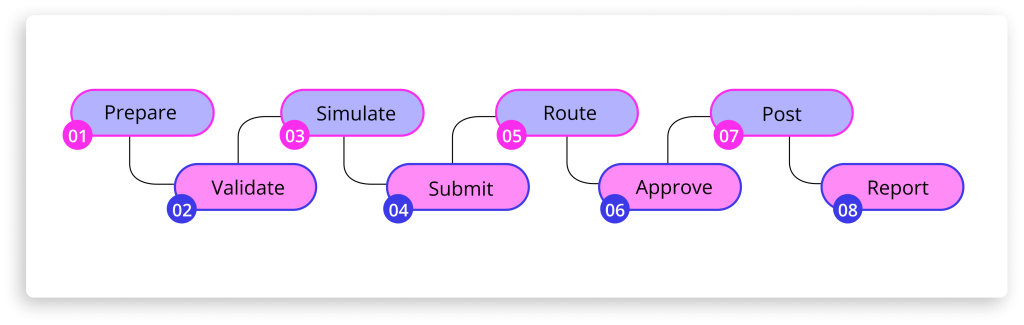
A journal entry solution for SAP processes a manual journal through eight connected stages: Prepare, Validate, Simulate, Submit, Route, Approve, Post, and Report. Each stage must be connected to the next for the control to hold. A useful evaluation is to follow one journal through the complete process:

Instead of fixating on the number of individual features within the process, teams must focus on keeping each stage connected to the next.

Consistency helps enforce the right controls at the right stage.

See Promenta’s SAP Journal Entry Workflow solution

Native SAP Journal Workflow vs External Solutions: Key Differences

When evaluating a journal entry solution for SAP, organisations typically choose between three models: native SAP-configured workflow, bespoke custom development, or an external close platform that interfaces with SAP. The right SAP journal entry management software should fit the organisation’s deployment model, control requirements and upgrade path. The table below compares a configured SAP-native journal workflow with bespoke or external workflow approaches across key governance dimensions.

Some organisations develop functionality inside SAP. Others use external close or workflow platforms. Others prefer a configured SAP-native solution.

The most appropriate approach depends on the organisation’s SAP landscape, wider finance architecture, control requirements and existing technology investments.

Dimension SAP-Native Journal Entry Solution Bespoke or external workflow
Approval rules Can be maintained through configured workflow logic, depending on the solution May be maintained through custom development or on a separate platform
Validation point Can validate directly against SAP finance rules before submission Depends on the design and integration; some SAP-specific validation may rely on interfaces or occur later
Finance data during approval Remains within the SAP environment May be processed or stored on an additional platform
Evidence and attachments Remains connected to the SAP workflow and finance document May reside across the workflow platform, SAP and other repositories
Governance scope Keeps workflow and evidence within the existing SAP control environment Introduces additional applications, interfaces or connectors for IT and control teams to consider
Ownership Product configuration and maintenance can remain vendor-supported Bespoke developments require internal ownership or ongoing implementation support
Upgrade considerations SAP-certified products can reduce some compatibility concerns, although appropriate testing is still required Custom code and integrations may require additional regression testing or remediation during upgrades

This architectural distinction matters because journal governance depends not only on the approval steps.

It also depends on where sensitive finance data is stored, where validation takes place, how access is controlled, and where audit evidence is retained. For a step-by-step breakdown of how approval routing works in practice, see the SAP Journal Entry Approval Workflow guide.

How Promenta’s Journal Entry Solution for SAP Works

Once the process and control requirements are clear, the technology decision becomes easier to assess.

Promenta’s SAP Journal Entry Management Workflow deploys and runs inside SAP ECC or S/4HANA and integrates with the organisation’s existing SAP finance rules, transactional validation and security model. The solution is SAP certified for ECC and S/4HANA.

Preparers can work through the browser or use the Promenta Excel Add-in.

So, Excel can remain part of journal preparation without operating outside the controlled process.

Journal requests can include supporting documentation, undergo posting simulation before submission, and follow configurable approval routing based on finance-relevant fields. Browser and SAP Fiori mobile approvals are supported, while process and audit reporting remain available from within SAP.

Promenta has specialised in SAP data process automation since 2002 and is certified by SAP as a provider of SAP solutions.

What Should Change at the Next Close?

A better journal entry solution for SAP should not require finance teams to choose between control and efficiency.

The objective is to improve both.

Early validation can reduce rework, and rule-based approval can improve consistency.

Connected evidence can strengthen audit readiness.

Better process visibility can help controllers identify outstanding journals before they become a close issue.

And Excel can continue to support journal preparation where it remains the most practical tool.

The end goal should be to support manual journals with a better control process.

Before the next period end, finance leaders may want to consider three questions.

● Can controllers see which journals are prepared, awaiting approval, approved and posted without reconciling several trackers?

● Can finance or internal audit demonstrate who prepared and approved a specific journal and retrieve its supporting evidence from a connected process?

● And if the SAP landscape changes, can the journal workflow move with it without creating an unnecessary governance and maintenance burden?

If those questions are difficult to answer, the issue may lie less with journal preparation itself and more with the process surrounding it.

Frequently Asked Questions

A journal entry solution for SAP should be evaluated on where validation takes place, how approval rules reflect the organisation’s governance model, how segregation of duties is enforced, where supporting evidence is retained, and how the workflow survives SAP upgrades.

Finance teams should consider where validation takes place, whether approval rules can reflect the organisation’s governance model, how segregation of duties is enforced, where supporting evidence is retained and how the workflow is maintained through SAP changes.

Architecture should also form part of the evaluation.

A solution that requires journal data, approval records and evidence to move across several systems and outside of your network creates a different control model from one that operates natively within SAP.

Yes.

Faster posting does not necessarily require fewer controls.

Delays often occur because errors are identified late, journals need to be resubmitted or approvers need to be chased manually.

Earlier validation and structured routing can address those delays while preserving the required review and approval process.

A native workflow operates within the SAP environment and can use the existing SAP finance rules, validation logic, security and authorisation model.

A non-native workflow operates through an additional platform, potentially outside your network and interfaces with SAP.

That does not make an external platform inherently unsuitable. Many organisations use them successfully, particularly across mixed ERP environments.

The distinction is architectural.

Finance and SAP teams should understand where journal data and approval evidence reside, where SAP-specific validation takes place, what integrations are required and which systems form part of the governance and audit environment.

Yes.

Excel remains useful for calculations, analysis and complex journal preparation.

If the preparation process has a real-time integration with SAP master data and validation, submits the completed journal into a governed approval workflow and preserves the required supporting evidence, Excel can remain the preparation layer while the control framework continues to operate in SAP. Finance teams can also use Promenta’s free SAP journal posting Excel upload tool as an entry point to that governed process.

A structured journal workflow can reduce risks created by fragmented evidence, inconsistent approvals, late validation, and poorly controlled access.

It does not remove the need for audit testing or professional judgement.

PCAOB requirements continue to require journal-entry testing as part of the auditor’s response to management-override risk.

What a controlled workflow can change is the quality of the evidence available: identifiable preparers and approvers, demonstrable separation of duties, connected supporting documentation and a consistent population from which journals can be reviewed.

SAP Journal Entry Upload Template: How to Use It and Common Mistakes to Avoid

When journal volumes increase during period close, entering every line directly into SAP is not practical. Finance teams typically prepare journals in Excel and use an SAP journal entry upload template to move the data into the system more efficiently.

Accruals, provisions, reclassifications, intercompany entries and other adjustments frequently require finance judgement, calculations and supporting analysis before they can be posted.

Excel remains a practical environment for much of that preparation.

For many SAP finance teams, SAP Excel journal upload through a structured template is the starting point – though the controls around that upload matter as much as the template itself.

An SAP journal entry upload template helps structure the journal data into fields SAP can process, reducing the need to enter each line individually.

The template has an important role.

But a well-structured upload file is not the same as a well-controlled journal process.

The more important question is what happens between preparation and posting: whether values are checked against current SAP data, approval requirements are enforced consistently, supporting evidence remains connected to the journal, and whether the resulting audit trail is complete.

Depending on the SAP version, deployment model and posting process, SAP can perform checks when journal data is uploaded and can also provide verification workflows. However, the spreadsheet template itself does not necessarily have a live view of SAP master data, posting periods, validation rules or approval requirements while the journal is being prepared.

This distinction matters.

The question is not whether finance teams should stop using Excel. It is whether the SAP journal posting controls around validation, approval, supporting evidence and segregation of duties remain effective as the journal moves from preparation to posting.

A 2025 survey of 100 finance professionals found that 94% used Excel during the month-end close, while 50% identified managing the close in Excel as the key reason preventing a faster close. This broadly illustrates some of the challenges of relying on spreadsheets to bridge fragmented systems and processes, specifically Excel processes that are not integrated closely enough with SAP.

It is also why tools such as Promenta’s free SAP Excel journal upload tool exist to connect Excel preparation to controlled SAP posting, with live validation and an approval workflow running natively inside SAP.

This article explains how an SAP journal entry upload template fits into that process, the mistakes finance teams should consider, and where additional controls – including those required for SAP journal entry compliance – may be required.

SAP ECC mainstream support ends 2027. See how Promenta keeps journal control inside SAP through the transition.

What Is an SAP Journal Entry Upload Template?

An SAP journal entry upload template is a structured Excel or CSV file that organises journal header data (company code, document type, posting date, currency) and line items (G/L accounts, amounts, cost centres, profit centres) into a format that SAP can process. It improves preparation efficiency during period close but does not itself validate entries against live SAP data, enforce approval, or create an audit trail.

The template normally contains journal header information such as :

It also contains the individual journal line items, which may include G/L accounts, amounts, debit and credit values, cost centres, profit centres, assignments and explanatory text.

SAP S/4HANA, for example, provides standard functionality for uploading multiple general journal entries from a spreadsheet template. SAP performs checks before posting the uploaded journal data.

Essentially, the template performs a specific job: it structures the data.

While a structured file can improve consistency, it does not demonstrate if the complete journal process is controlled.

Approval routing, segregation of duties, supporting evidence, live master-data validation, posting simulation and audit reporting may sit elsewhere in the process depending on how the organisation has configured SAP and any surrounding systems.

Why a Single Generic SAP Journal Entry Upload Template Creates Control Risks

Often, recurring upload mistakes are attributed to preparer error. Most are structural, and the structure in question is a single generic template asked to serve every journal type a finance team posts.

The thing is – not every journal requires the same information or level of review.

A reversal, for example, may require a reversal date and evidence supporting the calculation.

An intercompany journal may require trading-partner information and additional checks around the corresponding entity.

Payroll-related journals may require more restricted access to supporting information.

The exact requirements vary by organisation.

Finance teams must consider that different journal types can have varying :

This does not necessarily mean that every journal type needs a separate spreadsheet; it means the process must be able to recognise and enforce the requirements that apply to the journal being submitted.

A generic format can become a control weakness when those distinctions exist only in procedure documents or in the preparer’s memory.

Instead of simply standardising the file, teams should aim to standardise the control applied to the journal.

How to Use an SAP Journal Entry Upload Template Correctly

When used correctly, an SAP journal entry upload template can be an effective preparation tool within a controlled journal process.

How to Upload Journal Entries in SAP Correctly: A Step-by-Step Process

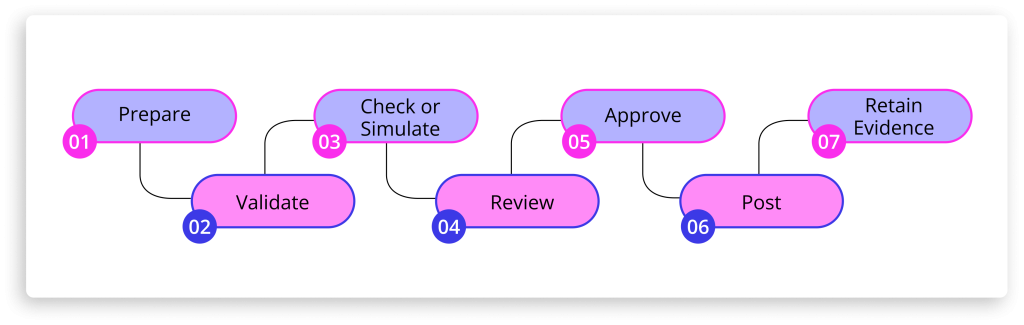
A standard process should include the following stages :

1. Start with the requirements for the journal

Establish the journal’s requirements before entering any figures.

Before entering figures, finance teams should establish what the journal requires.

This may include mandatory fields, supporting evidence, reversal treatment, cost objects, references and the appropriate approval route.

Where several journal types use the same template, those requirements still need to be enforced consistently across the process.

2. Prepare using current SAP master data

Prepare using current SAP master data, not values copied from a previous period.

G/L accounts, cost centres, profit centres and other master-data values can change between accounting periods.

Using values copied from a previous journal therefore introduces avoidable risk.

A cost centre may have been closed.

A G/L account may have been blocked.

An organisational assignment may have changed.

Where possible, journal preparation should use current SAP values rather than relying on historical spreadsheets.

3. Validate as early as possible

Validate the journal as early in the process as possible.

The timing of validation matters.

Errors identified while the preparer is still working on the journal are generally easier to correct than errors discovered after submission or during posting.

SAP itself performs validation during journal processing, and connected preparation tools may bring some of those checks closer to the point of entry.

Teams should focus on validation at the point where it is most useful.

4. Check or simulate the posting before approval

Check or simulate the posting before submitting the journal for approval.

A journal may appear complete in Excel and still fail SAP posting rules.

Posting periods, account assignments and configuration rules are maintained within SAP. Posting periods, for example, must be open for journal entries to be posted.

A posting check or simulation can therefore identify problems before the journal progresses too far through the approval process.

SAP’s journal-entry APIs also distinguish simulation as a test-mode process that performs business-related checks against the document being prepared.

5. Apply approval rules consistently

Apply approval rules consistently and enforce them through the workflow, not through individual memory.

Journal approval should reflect the organisation’s control policy.

Depending on the organisation, routing may be influenced by company code, journal value, G/L account, journal type or other risk-relevant criteria.

Consistency is an important issue.

Approval should not depend on the preparer remembering which person to email – a structured SAP journal entry approval workflow enforces routing by rule, not by memory.

Where segregation of duties requires independent review, that separation should also be enforced through system access and workflow rather than relying only on procedure.

6. Keep supporting evidence connected to the journal

Keep all supporting evidence connected to the journal record inside SAP.

A complete journal record extends beyond the debit and credit lines.

Supporting calculations, explanations and approval evidence may all be relevant when the journal is reviewed later.

Where documentation is stored separately from the journal, retrieval becomes an additional reconciliation exercise.

Supporting documentation belongs against the SAP finance document, not in a shared folder, and the requester, approvers and timestamps should be reportable from the same system that holds the posting.

Common SAP Journal Entry Upload Template Mistakes and How to Avoid Them

Most SAP journal entry upload template problems are not caused by the spreadsheet format alone.

They occur when a control is missing, inconsistent, or applied too late in the process.

Using an old journal as the starting point

Previous journals are convenient reference points.

They can also carry forward outdated master data, obsolete account assignments and values that were correct for a different accounting period.

Although previous files can be useful for calculations and recurring structures, they should not automatically be treated as the source of current SAP master data.

Assuming a structured template has validated the journal

A file may contain every required column and still contain an invalid value.

This is an important distinction.

Formatting checks structure. SAP validation checks whether the data is acceptable to the system.

The two should not be confused.

Using a generic template without journal-specific requirements

A generic upload format may be perfectly adequate where the organisation applies journal-specific requirements elsewhere.

The risk arises when nothing in the process distinguishes an accrual from an intercompany journal, payroll entry, provision or reclassification.

In that situation, mandatory evidence and approval requirements can become dependent on individual knowledge rather than process design.

Validating only when the journal reaches posting

Late validation increases rework.

A journal that fails after review may need to be corrected, returned and reviewed again.

Bringing appropriate validation closer to preparation can reduce that cycle while still leaving finance judgement with the preparer and approver.

See Promenta's SAP Journal Workflow in Action

Built natively on SAP. No external servers, no duplicate financial data.

Balancing the spreadsheet rather than the SAP documents

A complete worksheet may net to zero while individual documents within it do not satisfy the relevant balancing requirements.

Where several journal entries are included in one upload, validation needs to operate at the appropriate document level rather than relying only on a workbook total.

Handling high-volume journals manually

Large journals require particular care.

SAP’s line-item treatment is more nuanced than a simple universal 999-line rule.

In SAP ECC, the 999-line limit is associated with the three-digit BSEG line-item field. In S/4HANA, SAP uses a six-digit line-item counter in ACDOCA, although BSEG and particular posting interfaces or applications can still make the 999-line threshold relevant.

For example, SAP’s standard Upload General Journal Entries documentation states that, by default, each uploaded general journal entry can contain a maximum of 999 line items.

So, a journal with 999+ line items must be split across different documents.

The problem is not the split; it is who makes it.

When a preparer chooses the break points, builds the balancing entries by hand, and submits the files separately, the business event ends up in several unlinked documents with no single approval covering it.

Keeping approval evidence in email

Email may be convenient for communication.

It is less effective as the primary audit record for journal approval.

When approval history, supporting documents and the final posting are held in separate locations, finance and internal audit teams may need to reconstruct the complete record later.

The issue is not simply email.

It is the fragmented evidence chain.

Common issue Potential consequence Where the control should sit
Outdated copied master data Posting failure or incorrect account assignment Validation against current SAP data
Generic format without journal-specific requirements Missing fields, evidence or approval Preparation rules and workflow
Closed posting period Journal rejected at posting Pre-submission check or posting simulation
Document-level imbalance Failed or incomplete posting Document-level validation
Manual high-volume splitting Additional reconciliation and approval risk Controlled system processing
Approval held separately in email Fragmented audit evidence Workflow and connected audit trail

When to Move Beyond an SAP Journal Entry Upload Template

A pattern runs through these examples.

The spreadsheet is rarely the entire problem.

Challenges usually begin when the processes around it are not adequately controlled or governed.

SAP S/4HANA already provides baseline journal upload and verification capabilities, and these may be appropriate for organisations whose requirements are relatively simplistic.

However, many organisations may require additional control around Excel-based preparation, multiple journal-specific templates, deep SAP integrated validation, workflow routing, high-volume processing, supporting evidence or process reporting.

This is where the architecture becomes important.

For organisations looking to retain Excel for journal preparation while applying proper controls, Promenta’s SAP journal entry upload solution provides an SAP-native journal management workflow with live validation, enforced approval, and a complete audit trail inside SAP.

The inbuilt Promenta Excel Add-in allows preparers to work in Excel while using SAP-connected pick lists and deep SAP transactional level validation and submitting journal requests into workflow from the spreadsheet. Promenta also creates a fully validated virtual journal document and performs a posting simulation before a request can progress to SAP park or workflow  approval.

Approval workflows can be configured using any field in the journal request such as company code, G/L account and journal value, with support for multiple approval levels, substitutes and team inboxes.

Promenta also supports auto-posting and controls that prevent a requester from approving their own journal. Where the organisation’s access model permits, a controlled workflow can also help reduce the need for end users to retain powerful direct finance posting transactions.

For high-volume journals, Promenta can automatically divide journals across multiple SAP documents using configurable line thresholds and balancing accounts while retaining them within the same workflow request. It also supports multiple independent journal documents within a single request.

Supporting documentation can be saved against the SAP finance document, while workflow history and process reporting remain available from within SAP.

Promenta Journal Entry Management Workflow runs natively in SAP ECC and S/4HANA without any external server requirement keeping all sensitive finance data inside SAP the system of record, maintaining a strong compliance posture.

This architectural distinction can be relevant to finance, IT and internal audit teams.

Keeping the workflow close to SAP can allow SAP finance rules, security and transaction validation to remain central to the process while reducing the number of additional systems across which sensitive journal data and audit evidence need to be governed.

The objective is not automation for its own sake.

It is to implement an SAP journal entry process that improves efficiency without weakening control.

Conclusion

Finance teams should rightly prepare journals in a tool they know – Excel.

Flat non-SAP integrated journal Excel files have significant limitations.

For organisations that want to retain Excel preparation while applying real-time SAP-integrated validation and posting controls, Promenta offers an enterprise grade SAP journal management tool covering preparation, validation, workflow, audit, supporting documentation and auto-posting, all reportable and natively inside SAP, your system of record.

See a Controlled SAP Journal Process in Practice

See how Promenta moves journal preparation, validation, approval, and audit into a single controlled process inside SAP ECC or S/4HANA.

Frequently Asked Questions

An SAP journal entry upload template allows finance teams to structure multiple journal lines or journal documents in a format that can be uploaded into SAP rather than entering each line manually.

It is particularly useful for higher-volume manual journal activity during period close.

The template supports preparation efficiency. The controls around validation, approval, evidence and posting depend on the SAP process and any workflow configured around it.

The spreadsheet template itself should not be confused with SAP validation.

Standard SAP journal upload functionality cannot perform checks on journal data before upload, and custom workflows are possible.

Where Excel based journal functionality offered by Promenta is connected directly to SAP through an add-in or workflow solution, validation can be moved closer to the point of preparation.

The key consideration is where the check occurs and whether the preparer can correct the issue before it creates unnecessary rework at later stages.

Journal uploads can fail for several reasons, including invalid or inactive master data, closed posting periods, incomplete account assignments, document-balancing issues, or other SAP configuration and validation rules.

Some of these conditions can change between accounting periods.

This is why finance teams should avoid assuming that values copied from a previous journal remain valid for the current posting.

Not by itself.

The file records the journal data contained within it.

A complete journal audit trail normally also needs to capture who prepared or submitted the journal, who reviewed and approved it, when those actions occurred, what supporting evidence was provided, and when the journal was finally posted.

That evidence may be provided through SAP or a journal workflow created around the template.

The control objective is to keep the record complete, connected and easy to retrieve.

An SAP journal entry upload template structures journal data for upload into SAP. A controlled journal process adds live SAP validation, enforced approval, segregation of duties, and a continuous audit trail around that upload.

The template handles the data format. The process controls what happens to that data before and after it is submitted to SAP.