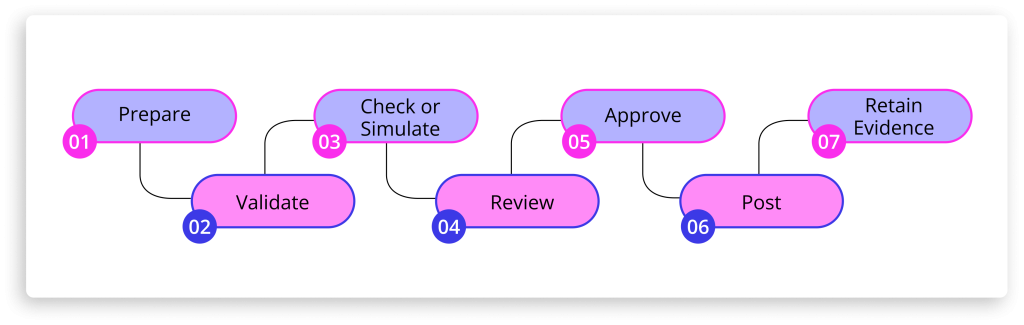
Bulk journal entry posting in SAP means preparing, validating, approving and posting many journals at once, often hundreds at period close. The main risks are rushed approvals, errors that surface only at posting, and journals above SAP’s 999 line-item limit. A controlled process simulates every journal before approval and keeps the evidence in SAP.
Why Is High-Volume Journal Processing Hard at Period Close?
Most manual journal activity lands in the final days of the period. Accruals, reclassifications, allocations, and intercompany adjustments arrive together, often aslarge Excel upload files built by several teams. Bulk journal entry posting in SAP is where close delay risk and audit risk meet: the more entries pass through a short window, the less scrutiny each one receives.
That window is tight. APQC’s Open Standards Benchmarking puts the median finance shared services centre at eight days to complete the monthly financial close, across a sample of more than 3,000 organisations. Every journal raised in those days still has to be prepared, reviewed, approved, and posted without weakening the controls that auditors will later test.
High volumes of month-end close journal entries are creating risk if your team recognises any of these:
Large journals split by hand across several uploads, with no single approval record
Approvers working through dozens of emailed spreadsheets in the final days of close
Errors that only surface at posting, which forces rework when time is shortest
No live view of which journals are pending, rejected, or posted
Supporting evidence stored separately from the posted document
How Promenta Handles Bulk Journal Entry Posting in SAP
Promenta’sSAP Journal Entry Workflow applies the same controls to a peak close as to a quiet month. Six capabilities support enterprise journal entry volume:
Excel preparation at scale
Multiple journals per request
Simulation before approval
Users prepare journals in Excel through the Promenta Excel Add-In, with SAP pick lists built in. Entries are validated against live SAP master data during preparation.
Several journals travel in a single request, so one batch of close activity follows one approval path. Approvers review related entries together.
A full posting simulation runs before any request is submitted for approval. Errors surface to the preparer, not the approver.
Large line counts
Rule-based routing
Evidence attached
Journals above SAP’s 999 line-item entry limit are supported within the same controlled request. A large allocation remains one governed item. [Confirm with Promenta: the journal is posted as several SAP documents under one request, so approval and evidence stay together.]
Routing uses any meaningful field in the request, such as company code, G/L account, or journal value. Each journal reaches the right approval group without manual sorting.
Multiple support attachments can be included in each request. They are saved in SAP against the posted finance document.
What Is the SAP 999 Line Item Limit for Journal Entries?
The SAP 999 line item limit restricts a financial document to 999 line items in the entry view, because the line-item number is a three-digit field (SAP KBA 2789867). Posting past it returns error F5727, “Maximum number of items in FI reached,” and the limit cannot be changed in configuration. Payroll accruals, cost allocations, and intercompany recharges are the journals most likely to pass that ceiling at close.
Document splitting adds a further planning consideration. In S/4HANA, document splitting can generate additional line items in the general ledger view, so a large journal has to be planned against the lines splitting will add as well as the lines that were prepared. Lines SAP generates automatically, such as tax lines, also count toward the limit.
Posting more than 999 line items in SAP is now a baseline expectation forSAP journal entry automation software. For a controller, the questions worth asking come after the data is loaded
Is the large journal simulated before it goes for approval?
Is it approved as one request, or broken into fragments with separate sign-offs?
Does its supporting evidence sit against the posted document?
How Should Approval Routing Work at Peak Close Volume?
Batch journal posting with approval depends onapproval workflow routing that keeps working when hundreds of requests arrive in the same week. Automation handles routing, notification, and follow-up. Human approvers remain the accountable control.
At close, routing needs to work without manual chasing:
Simple one-step approval through to multi-team, multi-level approval, based on request data
Approval substitutes and request forwarding when approvers are unavailable
Email notifications and team inboxes
Segregation of duties enforced, so a requester cannot approve their own request unless the rules allow it below an agreed threshold
AI is beginning to help finance teams draft and review journal data. Approval stays with a named person, because auditors test who authorised each entry.
How Do You Keep an Audit Trail for Hundreds of Journals?
Controllers need to know where every journal stands while the close is running. Auditors need proof of how each one was approved afterwards. Promenta reports both from within SAP :
Real-time process reporting on approved, posted, and pending journals
A reportable audit trail of every requester and approver, held within SAP
The option to remove powerful SAP Finance transaction codes from end users, supporting SOX compliance initiatives
Evidence is captured as each journal moves through the process, which reducesthe risk of manual journal entries at the point in the close when volume is highest.
SAP ECC mainstream support ends 2027. See how Promenta keeps journal control inside SAP through the transition.
Why Does SAP-Native Architecture Matter for High Journal Volumes?
In bulk journal entry posting in SAP, every hop between systems multiplies data movement, reconciliation points, and audit scope. Hundreds of journals prepared on anexternal close platform and posted back into SAP become hundreds of records to keep aligned across two systems.
Promenta is built natively on SAP and is an SAP Certified Partner Product. It uses existing SAP users, roles and authorisations, with zero external servers or middleware.
How a bulk upload tool compares with a controlled SAP-native workflow at close :
Area
Bulk upload only
Promenta
Validation timing
Often at posting
Full simulation before approval
Approval
Separate process or add-on
Built into the request
Evidence
Stored elsewhere
Saved against the SAP document
Infrastructure
May need external servers
Zero external servers or middleware
What Does a Controlled Bulk Journal Posting Process Look Like?
Promenta brings bulk journal entry posting in SAP into one governed sequence, at any volume:
Can your team evidence every journal posted in the last three days of close?
Where do errors in large journals surface today?
For teams starting with Excel-to-SAP journal processing, Promenta also offers a free SAP Journal Upload Tool, with the option to extend to full journal workflow capabilities.
1.What is the maximum number of line items in an SAP journal entry?
999 line items in the entry view, because the line-item number field in SAP has three digits. Posting more returns error F5727, “Maximum number of items in FI reached.”
2. What happens when a journal exceeds 999 lines in SAP?
SAP blocks the posting. Finance teams then split the journal, summarise lines, or use a tool that manages the split while keeping one approval record.
3. How many journal entries can be prepared and posted in a single run?
Promenta does not publish a fixed limit on journals per run. Practical throughput at close depends on the SAP system, its configuration, and how teams group related entries into requests. Each journal in a run goes through the same validation, simulation, and approval rules, so higher volume increases the workload but leaves the controls unchanged.
4. How are journals with more than 999 line items handled in SAP?
SAP caps a single financial document at 999 line items in the entry view. Promenta supports journals above that limit, so preparers submit a large journal as one controlled request rather than dividing it into separate uploads by hand. In S/4HANA, teams should also allow for extra general ledger lines created by document splitting.
5. Does high volume change how approval routing works?
No. The same routing rules apply to one journal or several hundred. What changes is the load on approvers in the final days of close. That is where substitutes, request forwarding, and team inboxes keep requests moving when individual approvers are unavailable or overloaded.
When journal volumes increase during period close, entering every line directly into SAP is not practical. Finance teams typically prepare journals in Excel and use an SAP journal entry upload template to move the data into the system more efficiently.
Accruals, provisions, reclassifications, intercompany entries and other adjustments frequently require finance judgement, calculations and supporting analysis before they can be posted.
Excel remains a practical environment for much of that preparation.
For many SAP finance teams, SAP Excel journal upload through a structured template is the starting point – though the controls around that upload matter as much as the template itself.
An SAP journal entry upload template helps structure the journal data into fields SAP can process, reducing the need to enter each line individually.
The template has an important role.
But a well-structured upload file is not the same as a well-controlled journal process.
The more important question is what happens between preparation and posting: whether values are checked against current SAP data, approval requirements are enforced consistently, supporting evidence remains connected to the journal, and whether the resulting audit trail is complete.
Depending on the SAP version, deployment model and posting process, SAP can perform checks when journal data is uploaded and can also provide verification workflows. However, the spreadsheet template itself does not necessarily have a live view of SAP master data, posting periods, validation rules or approval requirements while the journal is being prepared.
This distinction matters.
The question is not whether finance teams should stop using Excel. It is whether the SAP journal posting controls around validation, approval, supporting evidence and segregation of duties remain effective as the journal moves from preparation to posting.
A 2025 survey of 100 finance professionals found that 94% used Excel during the month-end close, while 50% identified managing the close in Excel as the key reason preventing a faster close. This broadly illustrates some of the challenges of relying on spreadsheets to bridge fragmented systems and processes, specifically Excel processes that are not integrated closely enough with SAP.
It is also why tools such as Promenta’s free SAP Excel journal upload tool exist to connect Excel preparation to controlled SAP posting, with live validation and an approval workflow running natively inside SAP.
This article explains how an SAP journal entry upload template fits into that process, the mistakes finance teams should consider, and where additional controls – including those required for SAP journal entry compliance – may be required.
SAP ECC mainstream support ends 2027. See how Promenta keeps journal control inside SAP through the transition.
An SAP journal entry upload template is a structured Excel or CSV file that organises journal header data (company code, document type, posting date, currency) and line items (G/L accounts, amounts, cost centres, profit centres) into a format that SAP can process. It improves preparation efficiency during period close but does not itself validate entries against live SAP data, enforce approval, or create an audit trail.
The template normally contains journal header information such as :
Company code
Document type
Document date
Posting date
Currency
It also contains the individual journal line items, which may include G/L accounts, amounts, debit and credit values, cost centres, profit centres, assignments and explanatory text.
SAP S/4HANA, for example, provides standard functionality for uploading multiple general journal entries from a spreadsheet template. SAP performs checks before posting the uploaded journal data.
Essentially, the template performs a specific job: it structures the data.
While a structured file can improve consistency, it does not demonstrate if the complete journal process is controlled.
Approval routing, segregation of duties, supporting evidence, live master-data validation, posting simulation and audit reporting may sit elsewhere in the process depending on how the organisation has configured SAP and any surrounding systems.
Why a Single Generic SAP Journal Entry Upload Template Creates Control Risks
Often, recurring upload mistakes are attributed to preparer error. Most are structural, and the structure in question is a single generic template asked to serve every journal type a finance team posts.
The thing is – not every journal requires the same information or level of review.
A reversal, for example, may require a reversal date and evidence supporting the calculation.
An intercompany journal may require trading-partner information and additional checks around the corresponding entity.
Payroll-related journals may require more restricted access to supporting information.
The exact requirements vary by organisation.
Finance teams must consider that different journal types can have varying :
Mandatory fields
Validation requirements
Supporting-document requirements
Approval thresholds
Review responsibilities
Segregation-of-duties requirements
This does not necessarily mean that every journal type needs a separate spreadsheet; it means the process must be able to recognise and enforce the requirements that apply to the journal being submitted.
A generic format can become a control weakness when those distinctions exist only in procedure documents or in the preparer’s memory.
Instead of simply standardising the file, teams should aim to standardise the control applied to the journal.
How to Use an SAP Journal Entry Upload Template Correctly
When used correctly, an SAP journal entry upload template can be an effective preparation tool within a controlled journal process.
How to Upload Journal Entries in SAP Correctly: A Step-by-Step Process
A standard process should include the following stages :
1. Start with the requirements for the journal
Establish the journal’s requirements before entering any figures.
Before entering figures, finance teams should establish what the journal requires.
This may include mandatory fields, supporting evidence, reversal treatment, cost objects, references and the appropriate approval route.
Where several journal types use the same template, those requirements still need to be enforced consistently across the process.
2. Prepare using current SAP master data
Prepare using current SAP master data, not values copied from a previous period.
G/L accounts, cost centres, profit centres and other master-data values can change between accounting periods.
Using values copied from a previous journal therefore introduces avoidable risk.
A cost centre may have been closed.
A G/L account may have been blocked.
An organisational assignment may have changed.
Where possible, journal preparation should use current SAP values rather than relying on historical spreadsheets.
3. Validate as early as possible
Validate the journal as early in the process as possible.
The timing of validation matters.
Errors identified while the preparer is still working on the journal are generally easier to correct than errors discovered after submission or during posting.
SAP itself performs validation during journal processing, and connected preparation tools may bring some of those checks closer to the point of entry.
Teams should focus on validation at the point where it is most useful.
4. Check or simulate the posting before approval
Check or simulate the posting before submitting the journal for approval.
A journal may appear complete in Excel and still fail SAP posting rules.
Posting periods, account assignments and configuration rules are maintained within SAP. Posting periods, for example, must be open for journal entries to be posted.
A posting check or simulation can therefore identify problems before the journal progresses too far through the approval process.
SAP’s journal-entry APIs also distinguish simulation as a test-mode process that performs business-related checks against the document being prepared.
5. Apply approval rules consistently
Apply approval rules consistently and enforce them through the workflow, not through individual memory.
Journal approval should reflect the organisation’s control policy.
Depending on the organisation, routing may be influenced by company code, journal value, G/L account, journal type or other risk-relevant criteria.
Consistency is an important issue.
Approval should not depend on the preparer remembering which person to email – a structured SAP journal entry approval workflow enforces routing by rule, not by memory.
Where segregation of duties requires independent review, that separation should also be enforced through system access and workflow rather than relying only on procedure.
6. Keep supporting evidence connected to the journal
Keep all supporting evidence connected to the journal record inside SAP.
A complete journal record extends beyond the debit and credit lines.
Supporting calculations, explanations and approval evidence may all be relevant when the journal is reviewed later.
Where documentation is stored separately from the journal, retrieval becomes an additional reconciliation exercise.
Supporting documentation belongs against the SAP finance document, not in a shared folder, and the requester, approvers and timestamps should be reportable from the same system that holds the posting.
Prepare → Validate → Check or Simulate → Review → Approve → Post → Retain Evidence
Common SAP Journal Entry Upload Template Mistakes and How to Avoid Them
Most SAP journal entry upload template problems are not caused by the spreadsheet format alone.
They occur when a control is missing, inconsistent, or applied too late in the process.
Using an old journal as the starting point
Previous journals are convenient reference points.
They can also carry forward outdated master data, obsolete account assignments and values that were correct for a different accounting period.
Although previous files can be useful for calculations and recurring structures, they should not automatically be treated as the source of current SAP master data.
Assuming a structured template has validated the journal
A file may contain every required column and still contain an invalid value.
This is an important distinction.
Formatting checks structure. SAP validation checks whether the data is acceptable to the system.
The two should not be confused.
Using a generic template without journal-specific requirements
A generic upload format may be perfectly adequate where the organisation applies journal-specific requirements elsewhere.
The risk arises when nothing in the process distinguishes an accrual from an intercompany journal, payroll entry, provision or reclassification.
In that situation, mandatory evidence and approval requirements can become dependent on individual knowledge rather than process design.
Validating only when the journal reaches posting
Late validation increases rework.
A journal that fails after review may need to be corrected, returned and reviewed again.
Bringing appropriate validation closer to preparation can reduce that cycle while still leaving finance judgement with the preparer and approver.
See Promenta's SAP Journal Workflow in Action
Built natively on SAP. No external servers, no duplicate financial data.
Balancing the spreadsheet rather than the SAP documents
A complete worksheet may net to zero while individual documents within it do not satisfy the relevant balancing requirements.
Where several journal entries are included in one upload, validation needs to operate at the appropriate document level rather than relying only on a workbook total.
Handling high-volume journals manually
Large journals require particular care.
SAP’s line-item treatment is more nuanced than a simple universal 999-line rule.
In SAP ECC, the 999-line limit is associated with the three-digit BSEG line-item field. In S/4HANA, SAP uses a six-digit line-item counter in ACDOCA, although BSEG and particular posting interfaces or applications can still make the 999-line threshold relevant.
For example, SAP’s standard Upload General Journal Entries documentation states that, by default, each uploaded general journal entry can contain a maximum of 999 line items.
So, a journal with 999+ line items must be split across different documents.
The problem is not the split; it is who makes it.
When a preparer chooses the break points, builds the balancing entries by hand, and submits the files separately, the business event ends up in several unlinked documents with no single approval covering it.
Keeping approval evidence in email
Email may be convenient for communication.
It is less effective as the primary audit record for journal approval.
When approval history, supporting documents and the final posting are held in separate locations, finance and internal audit teams may need to reconstruct the complete record later.
The issue is not simply email.
It is the fragmented evidence chain.
Common issue
Potential consequence
Where the control should sit
Outdated copied master data
Posting failure or incorrect account assignment
Validation against current SAP data
Generic format without journal-specific requirements
Missing fields, evidence or approval
Preparation rules and workflow
Closed posting period
Journal rejected at posting
Pre-submission check or posting simulation
Document-level imbalance
Failed or incomplete posting
Document-level validation
Manual high-volume splitting
Additional reconciliation and approval risk
Controlled system processing
Approval held separately in email
Fragmented audit evidence
Workflow and connected audit trail
When to Move Beyond an SAP Journal Entry Upload Template
A pattern runs through these examples.
The spreadsheet is rarely the entire problem.
Challenges usually begin when the processes around it are not adequately controlled or governed.
SAP S/4HANA already provides baseline journal upload and verification capabilities, and these may be appropriate for organisations whose requirements are relatively simplistic.
However, many organisations may require additional control around Excel-based preparation, multiple journal-specific templates, deep SAP integrated validation, workflow routing, high-volume processing, supporting evidence or process reporting.
This is where the architecture becomes important.
For organisations looking to retain Excel for journal preparation while applying proper controls, Promenta’s SAP journal entry upload solution provides an SAP-native journal management workflow with live validation, enforced approval, and a complete audit trail inside SAP.
The inbuilt Promenta Excel Add-in allows preparers to work in Excel while using SAP-connected pick lists and deep SAP transactional level validation and submitting journal requests into workflow from the spreadsheet. Promenta also creates a fully validated virtual journal document and performs a posting simulation before a request can progress to SAP park or workflow approval.
Approval workflows can be configured using any field in the journal request such as company code, G/L account and journal value, with support for multiple approval levels, substitutes and team inboxes.
Promenta also supports auto-posting and controls that prevent a requester from approving their own journal. Where the organisation’s access model permits, a controlled workflow can also help reduce the need for end users to retain powerful direct finance posting transactions.
For high-volume journals, Promenta can automatically divide journals across multiple SAP documents using configurable line thresholds and balancing accounts while retaining them within the same workflow request. It also supports multiple independent journal documents within a single request.
Supporting documentation can be saved against the SAP finance document, while workflow history and process reporting remain available from within SAP.
Promenta Journal Entry Management Workflow runs natively in SAP ECC and S/4HANA without any external server requirement keeping all sensitive finance data inside SAP the system of record, maintaining a strong compliance posture.
This architectural distinction can be relevant to finance, IT and internal audit teams.
Keeping the workflow close to SAP can allow SAP finance rules, security and transaction validation to remain central to the process while reducing the number of additional systems across which sensitive journal data and audit evidence need to be governed.
Finance teams should rightly prepare journals in a tool they know – Excel.
Flat non-SAP integrated journal Excel files have significant limitations.
For organisations that want to retain Excel preparation while applying real-time SAP-integrated validation and posting controls, Promenta offers an enterprise grade SAP journal management tool covering preparation, validation, workflow, audit, supporting documentation and auto-posting, all reportable and natively inside SAP, your system of record.
See a Controlled SAP Journal Process in Practice
See how Promenta moves journal preparation, validation, approval, and audit into a single controlled process inside SAP ECC or S/4HANA.
What is an SAP journal entry upload template used for?
An SAP journal entry upload template allows finance teams to structure multiple journal lines or journal documents in a format that can be uploaded into SAP rather than entering each line manually.
It is particularly useful for higher-volume manual journal activity during period close.
The template supports preparation efficiency. The controls around validation, approval, evidence and posting depend on the SAP process and any workflow configured around it.
Does an SAP journal entry upload template validate entries before posting?
The spreadsheet template itself should not be confused with SAP validation.
Standard SAP journal upload functionality cannot perform checks on journal data before upload, and custom workflows are possible.
Where Excel based journal functionality offered by Promenta is connected directly to SAP through an add-in or workflow solution, validation can be moved closer to the point of preparation.
The key consideration is where the check occurs and whether the preparer can correct the issue before it creates unnecessary rework at later stages.
Why do journal uploads fail in SAP?
Journal uploads can fail for several reasons, including invalid or inactive master data, closed posting periods, incomplete account assignments, document-balancing issues, or other SAP configuration and validation rules.
Some of these conditions can change between accounting periods.
This is why finance teams should avoid assuming that values copied from a previous journal remain valid for the current posting.
Does an SAP journal entry upload template provide an audit trail?
Not by itself.
The file records the journal data contained within it.
A complete journal audit trail normally also needs to capture who prepared or submitted the journal, who reviewed and approved it, when those actions occurred, what supporting evidence was provided, and when the journal was finally posted.
That evidence may be provided through SAP or a journal workflow created around the template.
The control objective is to keep the record complete, connected and easy to retrieve.
What is the difference between an SAP journal entry upload template and a controlled journal process?
An SAP journal entry upload template structures journal data for upload into SAP. A controlled journal process adds live SAP validation, enforced approval, segregation of duties, and a continuous audit trail around that upload.
The template handles the data format. The process controls what happens to that data before and after it is submitted to SAP.